


Migrating a website is like performing surgery on a patient that needs to keep running a marathon. Whether you’re rebranding with a new domain, switching to a faster CMS, or consolidating multiple properties, the stakes are high. Get it wrong and you could watch years of SEO equity evaporate overnight.
Marcel Digital documented a case where a prospect lost 44% of organic traffic post-migration, roughly 500,000 users. iPullRank cites another example where White Fuse lost 50% of rankings after a domain switch despite following what they thought were best practices. These aren’t outliers. They’re what happens when SEO migration strategy is treated as an afterthought.

A careful migration can actually boost your performance. The key is understanding that successful migrations are 70% planning and 30% execution. This guide walks you through both phases, including something most migration guides ignore: how to protect your visibility in AI search engines like ChatGPT, Perplexity, and Claude.
Before you start, consider running an AI visibility audit to establish your baseline. In 2026, preserving AI citations matters just as much as maintaining Google rankings.
What is an SEO migration and why does it matter?
An SEO migration is the process of transferring search engine rankings, authority, and indexing signals from one website configuration to another. This happens during major changes like domain switches, CMS replatforming, URL restructuring, or site consolidations.
The core challenge is straightforward: search engines have spent years building an understanding of your site. They know which pages matter, how they relate to each other, and what queries you should rank for. A migration breaks those signals. Your job is to rebuild them as quickly and completely as possible.
Types of website migrations
Not all migrations are equal. Here’s what you’re dealing with:
- Domain changes: Moving from oldbrand.com to newbrand.com, often during rebranding
- Protocol shifts: HTTP to HTTPS (though this is largely standard now)
- CMS replatforming: WordPress to Shopify, Drupal to Webflow, or any platform switch
- URL restructuring: Changing category hierarchies, removing file extensions, or consolidating pages
- Site consolidations: Merging multiple domains or microsites into one property
- Hosting migrations: Moving to new servers for performance or scalability

Each type carries different risks. Domain changes are high-risk because every URL changes. CMS replatforming is complex because URL structures often change by default. Simple hosting migrations are lower risk but can still impact performance metrics that affect rankings.
The AI search complication
Here’s what traditional migration guides miss: in 2026, you’re not just preserving Google rankings. You’re protecting your visibility across AI search engines that cite and summarize content differently.
According to Brightedge, AI engines like Google’s AI Overviews, Perplexity, and ChatGPT don’t just index your site. They decide whether to include you in answers. During a migration, you risk losing AI trust if:
- Previously cited content is removed or merged without maintaining its identity
- Schema or structured data is dropped
- Pages become slower to render or fail accessibility standards
- Internal link structures are weakened, breaking topical authority chains
This is why we recommend tracking your AI visibility metrics before, during, and after any migration. The signals that matter for AI engines are subtly different from traditional ranking factors.
Pre-migration: Building your foundation
Rushing into a migration is how you become a cautionary tale. The pre-migration phase is where you prevent disasters, not just prepare for them.
Audit your current site
You can’t protect what you don’t understand. Start with a comprehensive audit that captures everything about your current site’s performance.
Technical inventory:
Use a crawling tool like Screaming Frog or Sitebulb to extract every URL, title tag, meta description, header structure, and internal link. This becomes your master reference document. If it’s not in this crawl, it doesn’t exist for migration purposes.
Performance benchmarks:
Export your Google Analytics 4 data with detailed annotations. Document:
- Organic traffic by page (last 12 months minimum)
- Conversion rates for key funnels
- Top traffic-driving pages
- Pages with the most backlinks
- Current keyword rankings for priority terms
Run Core Web Vitals tests on your key pages. Page speed often changes during migrations, and you need to know if you’re improving or regressing.
Content and metadata:
Document all schema markup, structured data implementations, and canonical tag configurations. These are easy to overlook during migration but critical for both traditional and AI search visibility.
For a thorough pre-migration assessment, try our free AI content audit to identify which content has the highest AI citation potential.
Create your migration inventory
This is the spreadsheet that will save your sanity. Create a master document with columns for:
- Old URL
- New URL
- Page priority (traffic volume, conversions, backlinks)
- Redirect status
- Content action (migrate, consolidate, retire)
- Schema preservation notes

Prioritize ruthlessly. Not every page deserves to survive. Shopify’s enterprise team recommends reviewing all existing pages and not transferring any that are just taking up space. URLs with poor rankings that generate little traffic should be redirected, not migrated. This improves your site’s overall content quality ratio.
Set up your staging environment
Your staging site is where mistakes happen safely. Set it up to mirror production as closely as possible.
Critical protections:
- Password-protect the entire staging environment
- Add noindex tags to every page
- Block crawlers via robots.txt
- Set up the same CDN and server configuration as production
Test your redirect implementation here first. Every redirect should be verified before it touches your live site. You can use our free AI crawler to check how AI bots will interact with your staging environment.
The AI search factor: Protecting your visibility in the age of LLMs
Traditional migration strategy focuses on preserving rankings and traffic. That’s still essential, but it’s no longer sufficient. Here’s how to protect your AI search visibility specifically.
Understanding AI citations
When ChatGPT or Perplexity recommends your content, they’re not just linking to you. They’re citing you as a source of truth. That citation carries weight beyond a simple backlink. It positions you as an authority on the topic.
During migrations, AI citations are vulnerable because:
- Entity relationships get disrupted when URLs change
- Topical authority chains break when internal linking changes
- Structured data that helps AI understand your content gets lost
Schema markup preservation
Schema markup is how you explicitly tell AI engines what your content means. During migrations, schema often gets stripped or broken.
Action items:
- Document all current schema implementations
- Test schema validation on staging
- Verify JSON-LD scripts render correctly on new platform
- Check that entity references (Organization, Person, Product) maintain consistency
For guidance on making your content more citable by AI systems, see our guide on how to get cited by LLMs.
Monitoring AI visibility
Set up tracking for AI-specific metrics before your migration:
- Brand mention frequency in ChatGPT responses
- Citation rates in Perplexity answers
- Appearance in AI Overview panels
Post-migration, watch for drops in these metrics just as closely as you watch organic traffic. Recovery strategies differ depending on whether you’ve lost traditional rankings or AI citations.
Our ChatGPT visibility tracker can help you monitor how your brand appears in AI responses throughout the migration process.
Launch day: Executing your migration
All your planning comes down to this. The goal is simple: make the transition invisible to users and search engines.
Implement 301 redirects
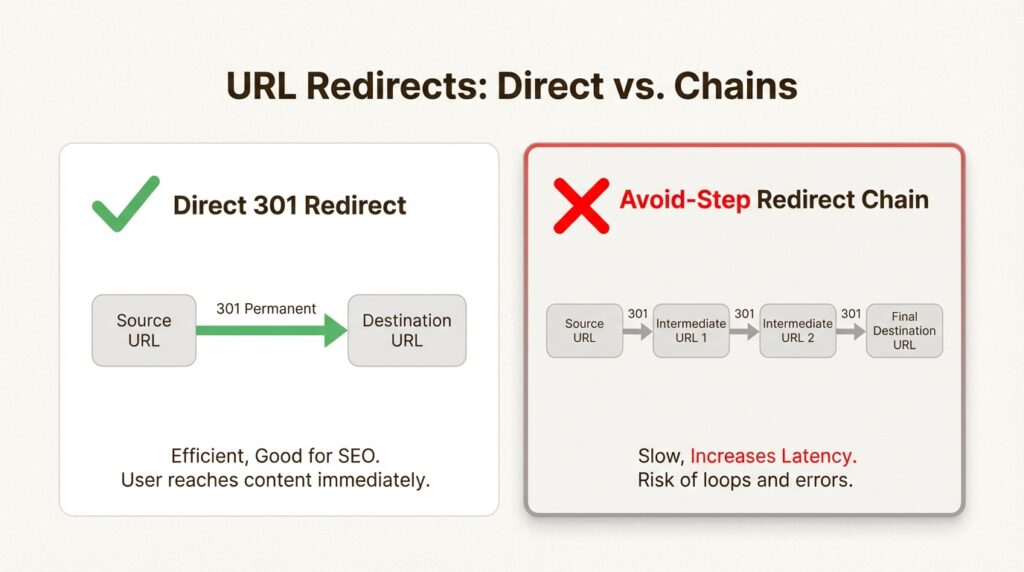
This is non-negotiable. Every old URL must redirect to its new counterpart with a 301 (permanent) redirect.
Best practices:
- One-to-one mapping: each old URL points to one specific new URL
- Avoid redirect chains: old → new, not old → intermediate → new
- Keep redirects active for at least one year (Google’s recommendation)
- Update internal links to point to final URLs, not redirects
Carla Wright, Solutions Engineer Lead at Shopify, puts it simply: “If managed correctly, your migration will not result in any traffic loss. That involves informing search bots of the new URL of every page.”
Go-live checklist
Before you flip the switch, verify:
- All noindex tags removed from production pages
- robots.txt updated to allow crawling
- XML sitemap generated with new URLs
- Google Search Console change of address submitted (domain migrations only)
- Analytics tracking codes firing correctly
- AI crawler access verified in robots.txt
Submit your new sitemap immediately after launch. Don’t remove the old sitemap yet. Let Google discover that those URLs are redirecting before you delete the reference.
Timing considerations
Launch during low-traffic periods, typically Tuesday through Thursday afternoons. Avoid weekends (coordination is harder) and peak business hours. Give yourself a buffer in case troubleshooting extends into the evening.
Post-migration: Monitoring and recovery
The migration isn’t over when the new site goes live. It’s over when your metrics stabilize.
Immediate validation (first 48 hours)
Check these items within the first two days:
- Crawl the site for 404 errors and broken redirects
- Verify key pages are indexable (use Google Search Console’s URL Inspection tool)
- Check that analytics tracking is capturing data correctly
- Test critical conversion funnels end-to-end
- Monitor server response codes in real-time
Ongoing monitoring (first 30-90 days)
Watch these metrics weekly:
- Organic traffic vs. pre-migration benchmark
- Keyword ranking positions for priority terms
- Crawl errors in Google Search Console
- Index coverage (are new pages being indexed?)
- Core Web Vitals scores
- AI visibility metrics and citation rates
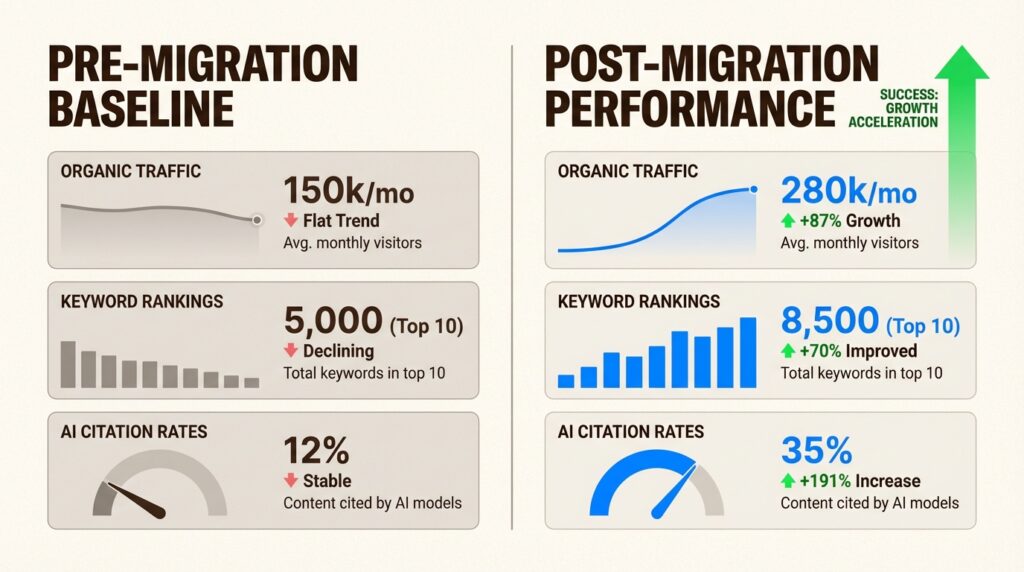
Expect some fluctuation. Search Engine Land notes that traffic fluctuations are normal in the short term. The key is catching problems before they become trends.
Use our ChatGPT visibility tracker to monitor whether your AI citations hold steady post-migration.
Traffic drop recovery playbook
If you see significant traffic loss, here’s how to diagnose and fix it:
If traffic drops more than 20%:
- Audit your redirect implementation immediately
- Check for orphaned pages that should be redirecting
- Verify noindex tags weren’t accidentally left on key pages
- Confirm your XML sitemap was submitted and processed
If specific pages lost rankings:
- Compare pre- and post-migration content
- Check that title tags and meta descriptions transferred correctly
- Verify internal linking structure is intact
- Look for cannibalization issues from URL changes
If AI citations dropped:
- Verify schema markup is still present and valid
- Check that entity references maintained consistency
- Ensure content structure (headers, lists) remained intact
- Monitor for changes in how AI engines cite your content
Sometimes you need expert help. Our AI + SEO services team specializes in post-migration recovery, particularly for AI visibility issues that traditional SEO agencies miss.
Common migration mistakes to avoid
Learning from others’ failures is cheaper than learning from your own. Here are the most common migration mistakes:
- Forgetting meta data: Title tags and meta descriptions don’t always transfer automatically. Verify each priority page manually.
- Leaving staging indexable: Duplicate content issues destroy SEO. Double-check that your staging environment is properly blocked.
- Using 302 redirects: Temporary redirects don’t pass link equity. Use 301s for permanent changes.
- Creating redirect chains: Each hop dilutes authority. Update internal links to point to final destinations.
- Changing too much at once: Don’t redesign, replatform, and restructure URLs simultaneously. Isolate variables so you can identify what caused any issues.
- Dropping structured data: Schema markup often gets stripped during platform changes. Verify it’s still present and valid.
- Ignoring AI visibility: Traditional SEO metrics miss half the picture in 2026. Monitor AI citations alongside rankings.
Emina Demiri-Watson, Head of Digital Marketing at Vixen Digital, offers blunt advice: “Website migration should not be about moving 💩 to your new website! It isn’t just about relocating. It’s a chance to improve your website for users.”
Start protecting your search visibility today
A successful SEO migration strategy comes down to preparation, precision, and patience. The work you do before launch determines your success more than anything that happens on launch day. Document everything, test thoroughly, and monitor obsessively.
In 2026, the stakes are higher than ever. You’re not just preserving Google rankings. You’re protecting your visibility across an ecosystem of AI search engines that cite, summarize, and recommend content in ways that traditional SEO metrics don’t capture.
The companies that thrive are the ones that treat AI visibility as a core migration consideration, not an afterthought.
Ready to benchmark your current AI visibility before your migration? Get a free AI visibility audit to understand how ChatGPT, Perplexity, and Claude currently cite your brand. Or contact our team to discuss how we can support your migration strategy.
Frequently Asked Questions
How long should an SEO migration strategy take to implement?
Timeline depends on site size and complexity. A 100-page site might take 4-6 weeks. A 10,000-page enterprise site could take 3-6 months. The key is not rushing the planning phase, which should consume about 70% of your total timeline.
What is the most critical element of any SEO migration strategy?
Proper 301 redirect implementation. Every old URL must redirect to its new counterpart with a permanent (301) redirect. Missing or incorrect redirects are the number one cause of traffic loss during migrations.
Can you recover from a failed SEO migration strategy?
Yes, but it takes time. Most traffic recovery happens within 3-6 months if issues are identified and fixed quickly. The key is diagnosing the specific problem (redirects, indexability, content changes) and addressing it systematically.
How does AI search change SEO migration strategy in 2026?
AI engines cite and summarize content differently than traditional search. You need to preserve schema markup, maintain entity relationships, and ensure content remains ‘snippet-extractable.’ Monitor AI visibility metrics alongside traditional rankings.
Should you migrate everything or prune content during an SEO migration?
Prune strategically. Content with no traffic, no backlinks, and poor rankings should be redirected, not migrated. This improves your site’s overall quality ratio and simplifies the migration process.
What’s the difference between a 301 and 302 redirect in SEO migration strategy?
301 redirects are permanent and pass link equity to the new URL. 302 redirects are temporary and don’t pass full equity. Always use 301s for migration redirects.
How do you monitor AI visibility during an SEO migration?
Track brand mentions in ChatGPT responses, citation rates in Perplexity, and appearance in AI Overview panels. Compare pre- and post-migration metrics to identify drops in AI search visibility.








Leave a Reply