


Here is a list of slash ( / ) command operators you can use change the intent of your prompt currently supported in ChatGPT. These commands make it easier to perform quick actions in a chat.
How to use it?
Just add the operator at the start of your prompt, use the framework role, task, output to better structure your prompts for ChatGPT.
| Operator | What it does to your prompt |
|---|---|
| /help | Displays a list of available slash commands. |
| /settings | Opens your ChatGPT settings (theme, personalization, memory, etc.). |
| /about | Shows info about ChatGPT (model, version, updates). |
| /clear | Clears the current conversation. |
| /new | Starts a new chat. |
| /rename | Renames the current chat. |
| /delete | Deletes the current chat. |
| /memory | Opens the memory management page (view, edit, or delete what ChatGPT remembers about you). |
| /forget | Clears or removes stored memory about you (if memory is enabled). |
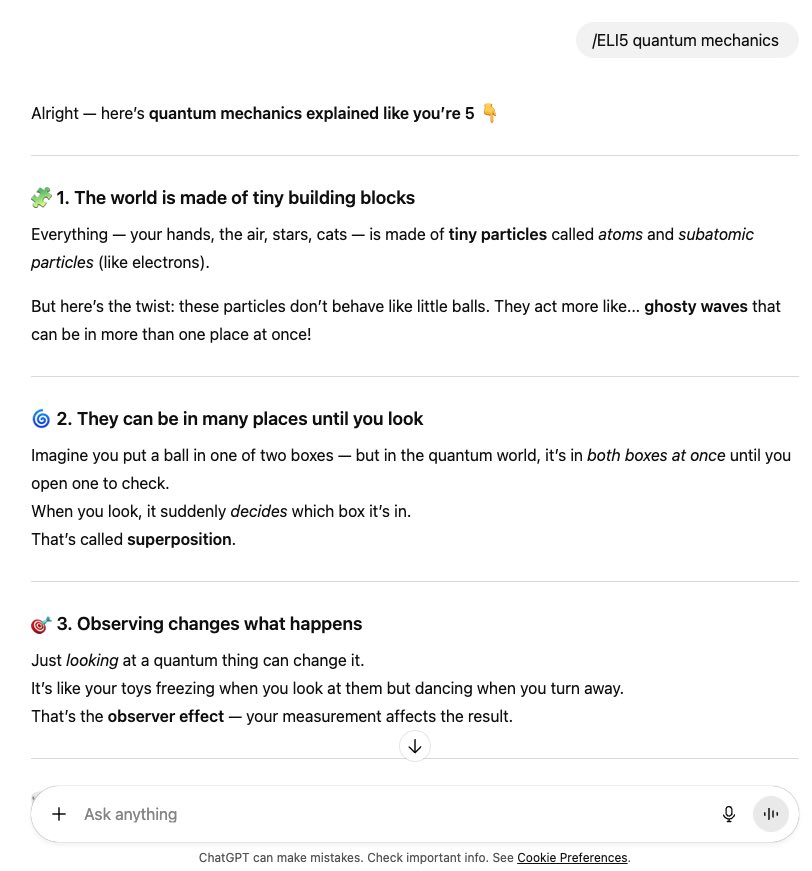
| /ELI5 | Explain as if to a 5-year-old. |
| /TLDL | Summarize a long text in a few lines. |
| /STEP-BY-STEP | Lay out reasoning steps in order. |
| /CHECKLIST | Turn the answer into a checklist of actions. |
| /EXEC SUMMARY | Give a short executive-style summary. |
| /ACT AS | Answer in a specific role. |
| /BRIEFLY | Reply in one or two concise sentences. |
| /JARGON | Use technical vocabulary appropriately. |
| /AUDIENCE | Adapt tone and detail to a target audience. |
| /TONE | Change the tone (formal, friendly, playful, etc.). |
| /DEV MODE | Use a raw, technical developer style. |
| /PM MODE | Respond with a project-management perspective. |
| /SWOT | Give strengths, weaknesses, opportunities, and threats. |
| /FORMAT AS | Enforce a specific format like table or JSON. |
| /COMPARE | Place two or more items side by side. |
| /MULTI-PERSPECTIVE | Show several points of view. |
| /CONTEXT STACK | Keep multiple layers of context active. |
| /BEGIN WITH / END WITH | Force the answer to start or end with given text. |
| /ROLE: TASK: FORMAT: | Set role, task, and expected format explicitly. |
| /SCHEMA | Generate a structured outline or data model. |
| /REWRITE AS: | Rephrase in a requested style. |
| /REFLECTIVE MODE | Briefly reflect on and refine the answer. |
| /SYSTEMATIC BIAS CHECK | Point out possible biases and gaps. |
| /DELIBERATE THINKING | Slow down and reason carefully. |
| /NO AUTOPILOT | Forbid superficial, templated replies. |
| /EVAL-SELF | Critique the answer and suggest fixes. |
| /PARALLEL LENSES | Examine the topic from several angles at once. |
| /FIRST PRINCIPLES | Rebuild the answer from basics. |
| /CHAIN OF THOUGHT | Request a brief outline of reasoning steps. |
| /PITFALLS | List likely traps, errors, and edge cases. |
| /METRICS MODE | Use measures, KPIs, or formulas. |
| /GUARDRAIL | Set strict boundaries not to cross. |
💬 Creative & Productivity Tools
/summarize Summarizes a long passage or conversation.
/rewrite Rewrites or improves selected text.
/expand Expands on an idea or adds more detail.
/shorten Makes text more concise.
/translate Translates selected text into a specified language.
/explain Explains a concept in simpler terms.
/tone Adjusts tone (e.g., formal, friendly, persuasive).
/bullet Converts text into bullet points.
/outline Creates an outline from content or ideas.
💻 Developer & Technical Commands
/code Generates or edits code in a selected language.
/debug Reviews code for bugs or errors.
/document Generates documentation for code.
/comment. Adds or improves code comments.
/explain-code Explains what a code snippet does.
🧩 Canvas & File Tools (in ChatGPT Team/Pro)
/canvas Opens or creates a new document/code canvas for collaboration.
/update Updates the current canvas with your latest instructions.
/comment Adds comments or feedback to a canvas.
/export Exports a canvas or document to a file (e.g., PDF, DOCX, TXT).
🎨 Image & Multimedia
/image Generates an image from a text description.
/edit-image Edits an uploaded image.
/describe-image Describes the contents of an image.
/make-chart Creates a chart or graph from data.
🔍 Web & Browsing (Pro feature)
/web Enables or performs a live web search.
/open Opens a specific URL to fetch or summarize content.
/cite Generates citations or references for sources.
⚙️ System / Power User
/mode Switches between modes (e.g., Default, Creative, Analytical, Code).
/version Displays the current ChatGPT model (e.g., GPT-5).
/feedback Sends feedback to OpenAI about the chat.
Example:
Related: SEO for ChatGPT






Leave a Reply