


Launching a new website is exciting. You’ve got your domain, your design looks sharp, and you’re ready for visitors. But here’s a sobering statistic: 96.55% of web pages get zero traffic from Google. That’s right. The vast majority of content published online never sees a single organic visitor.
The good news? New websites have unique advantages. You’re building with SEO in mind from day one. You can target long-tail keywords that established sites ignore. And you benefit from the “freshness factor” that Google rewards for new, relevant content.
But SEO for a new website requires patience. Realistic timeline? Six months or more before you see meaningful traffic. That might sound discouraging, but starting with the right foundation makes all the difference between joining that 96.55% or becoming one of the sites that actually get found.
At Decoding, we’ve spent 16 years helping businesses navigate this exact challenge. Here’s our practical, no-nonsense guide to SEO for new websites.
What you’ll need before starting
Before diving into optimization, make sure you have:
- A live website (even a minimal viable site works)
- A Google account for Search Console and Analytics access
- 2-4 hours for initial technical setup
- Optional: Free SEO tools (we’ll cover which ones actually matter)
That’s it. You don’t need expensive software or a marketing degree to get started.
Step 1: Set up your technical foundation
Think of technical SEO as your website’s electrical wiring. When it’s done right, everything else works. When it’s wrong, no amount of great content will save you. As Isaac Church from 3WH notes, “When our team kicks off SEO for a brand-new website, the first thing we check is indexing. There’s literally no point fixing anything if Google can’t even see the site.”
Connect Google Search Console immediately.
This free tool is your direct line to Google. It shows how the search engine sees your site, what queries bring visitors, and whether Google can properly crawl and index your pages. Google’s official setup guide walks you through verification options.
Verify your property using DNS verification rather than adding code to your site. It’s more reliable and won’t break if you change themes later. Once connected, submit your XML sitemap and use the URL Inspection Tool to manually request indexing for your most important pages.
Set up Google Analytics 4.
You need to understand how visitors interact with your site: what they click, where they come from, which pages perform best. GA4 is free and essential for tracking your SEO progress. Google’s Analytics setup documentation walks you through the implementation process.
Check these technical basics:
- HTTPS enabled: Google uses HTTPS as a direct ranking factor. Most hosting providers include SSL certificates free.
- XML sitemap submitted: This map helps search engines find all your important pages. Most CMS platforms generate this automatically.
- robots.txt configured: This file tells search engines which pages to crawl. Make sure you’re not accidentally blocking important content.
- Mobile responsiveness: Test your site on actual mobile devices. More than half of all web traffic comes from mobile.
Step 2: Find your first keywords
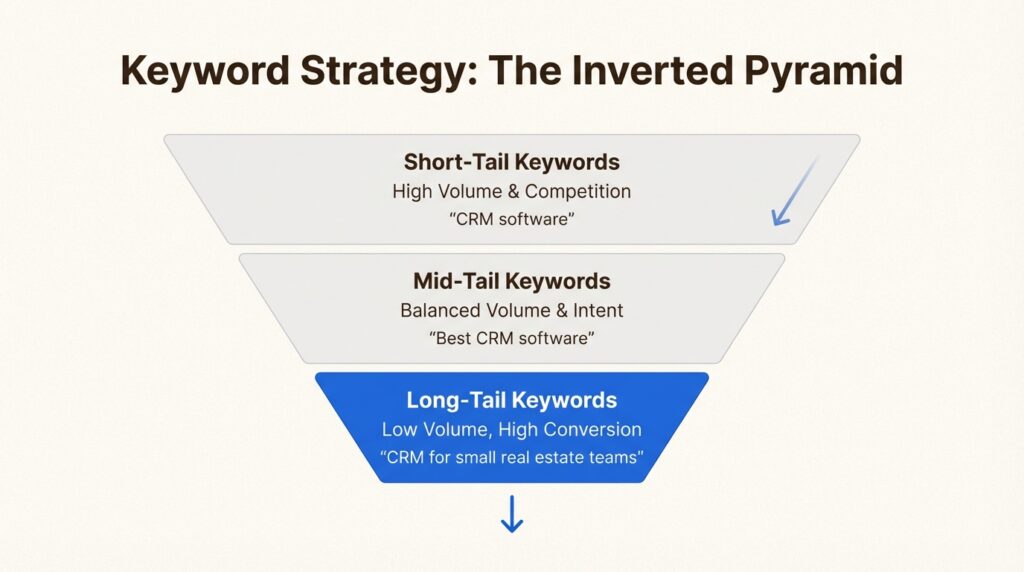
Here’s the reality for new websites: you cannot compete with established sites for competitive keywords. Not yet. A domain that’s been building authority for years will outrank you for “best CRM software” every time.
So what do you do? Target long-tail keywords.
Long-tail keywords are specific phrases (usually 4+ words) with lower search volume but also lower competition. Instead of targeting “CRM software,” you might target “CRM software for small real estate teams” or “affordable CRM for freelance consultants.” Backlinko’s research confirms this approach works: they generate 74% of their organic traffic from long-tail terms.
Free keyword research methods:
Start with Google’s own tools before spending money. Google Autocomplete shows suggestions as you type broad terms related to your business, reflecting actual search patterns. The People Also Ask boxes in search results reveal what people actually want to know. Related Searches at the bottom of results pages offer thematically-related keyword ideas. And Google Keyword Planner, free with a Google Ads account, shows search volume ranges and competition levels.
Understanding keyword difficulty:
New websites should initially focus on keywords with lower difficulty scores. Tools like Semrush and SE Ranking show difficulty metrics. Look for keywords marked “easy” or “very easy.”
Analyze the search results for your target keywords. If major brands with high domain authority dominate the first page, find related long-tail variations instead. As Victoria Kurichenko demonstrated, she grew her website to 10,000+ monthly visits with roughly 90 indexed pages by focusing on specific, targeted queries.
Match content to search intent:
Understanding why people search matters more than ever. Informational searches need educational content. Commercial searches need comparison content. Transactional searches need clear calls to action and conversion-focused pages.
Don’t create a product page if the top results are how-to guides. Don’t write a basic definition post if the results are all product comparisons.
Step 3: Create your first optimized pages
With keywords identified, it’s time to create content. But not just any content. Search engines prioritize helpful, reliable, people-first content. Google’s SEO starter guide emphasizes creating content for users first, not search engines.
Start with cornerstone content.
Create 3-5 comprehensive pages that thoroughly cover your core topics. These should be your best work: detailed, well-researched, and genuinely useful. Think 1,500+ words with original insights, not regurgitated fluff. Andrew Peluso from Bananas Marketing Agency recommends that “a simple, well-done WordPress website is going to give you the best chance at ranking.”
On-page optimization checklist:
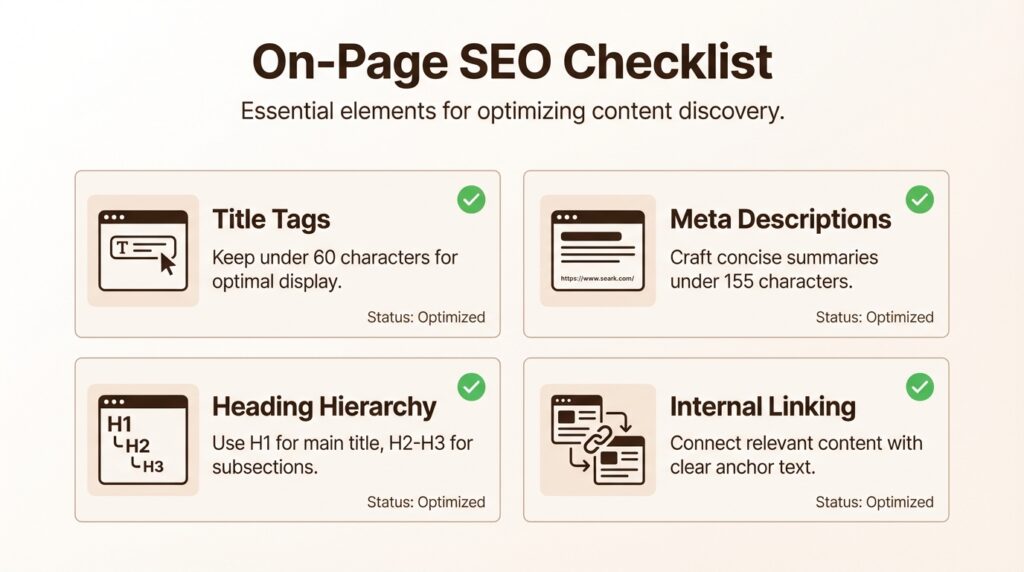
Title tags should stay under 60 characters with your primary keyword near the beginning. Think of them as your book covers in search results, they need to be compelling. Meta descriptions work like mini-advertisements: include your keyword and a clear value proposition under 155 characters. For heading structure, use one H1 per page (with your primary keyword), then H2s and H3s to create logical content hierarchy. Internal linking connects related pages, which helps distribute authority and keeps visitors engaged longer. Google’s title tag best practices documentation provides additional guidance.
Content quality standards:
Google evaluates content through the E-E-A-T framework. Experience means sharing specific examples, case studies, and real-world applications. Expertise requires demonstrating subject matter knowledge through comprehensive coverage. Authoritativeness comes from citing credible sources and earning mentions from respected sources. Trustworthiness involves providing transparent information, clear privacy policies, and secure architecture.
Include detailed author bios that highlight relevant credentials. Cite authoritative sources for claims. Show, don’t just tell.
Image optimization:
Before uploading images, use descriptive file names that include relevant keywords. Write compelling alt text describing the image content while naturally incorporating appropriate keywords. Compress images without sacrificing quality, and consider modern formats like WebP. Google’s image optimization guidelines provide specific recommendations for ranking in image search.
Step 4: Build initial authority signals
Links remain one of the strongest ranking factors. But the approach has evolved from quantity to quality.
One high-quality, relevant backlink from an authoritative site provides more value than dozens of generic directory links. Focus on earning links from sites topically relevant to your business.
Low-hanging fruit for new sites:
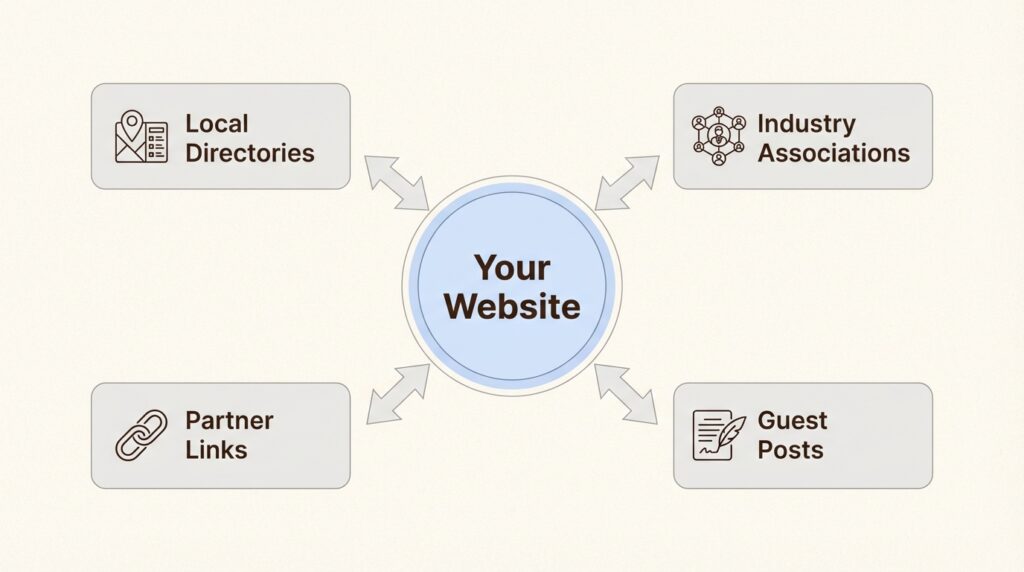
- Supplier and partner links: If you collaborate with other businesses, ask for a link.
- Local directories: Essential for location-based businesses.
- Industry associations: Many maintain member directories.
- Google Business Profile: Critical for local search visibility.
Create link-worthy content:
Data-driven studies, comprehensive guides, and unique insights earn links organically. Original research, industry surveys, and expert interviews create assets that provide long-term value.
Consider creating resource pages, tools, or calculators that solve specific problems. These functional resources often earn links naturally as people find and share them.
Internal linking strategy:
Strategic internal links help distribute authority throughout your site and guide users to your most important pages. Every new piece of content should link to 2-3 relevant existing pages on your site.
Step 5: Optimize for Core Web Vitals
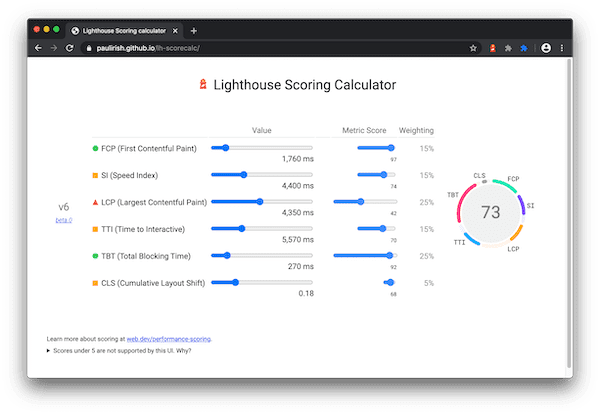
Google has used loading times as a ranking factor since 2018. Core Web Vitals measure real user experience through three key metrics:
Largest Contentful Paint (LCP) should load in under 2.5 seconds, measuring how quickly main content becomes visible. Interaction to Next Paint (INP) should stay under 200 milliseconds, measuring overall responsiveness. Cumulative Layout Shift (CLS) should remain under 0.1, measuring visual stability as pages load.
PageSpeed Insights is Google’s official tool that tests your URL and provides specific optimization suggestions. GTmetrix offers an alternative with detailed performance reports. Lighthouse is built into Chrome DevTools, letting you run audits directly in your browser.
Quick wins for speed:
- Compress all images without sacrificing visual quality.
- Implement lazy loading for images below the fold.
- Minify CSS and JavaScript files.
- Enable browser caching.
- Consider a Content Delivery Network (CDN) for global visitors.
Don’t obsess over perfect scores. Focus on the user experience. A site that loads in 2 seconds with great content beats a site that loads in 1 second with thin content. Statista data shows more than half of all web traffic now comes from mobile devices, so mobile performance matters as much as desktop.
Step 6: Plan for AI search visibility
Traditional SEO isn’t enough anymore. People increasingly use ChatGPT, Perplexity, and Gemini to find information. AI search works differently than Google.
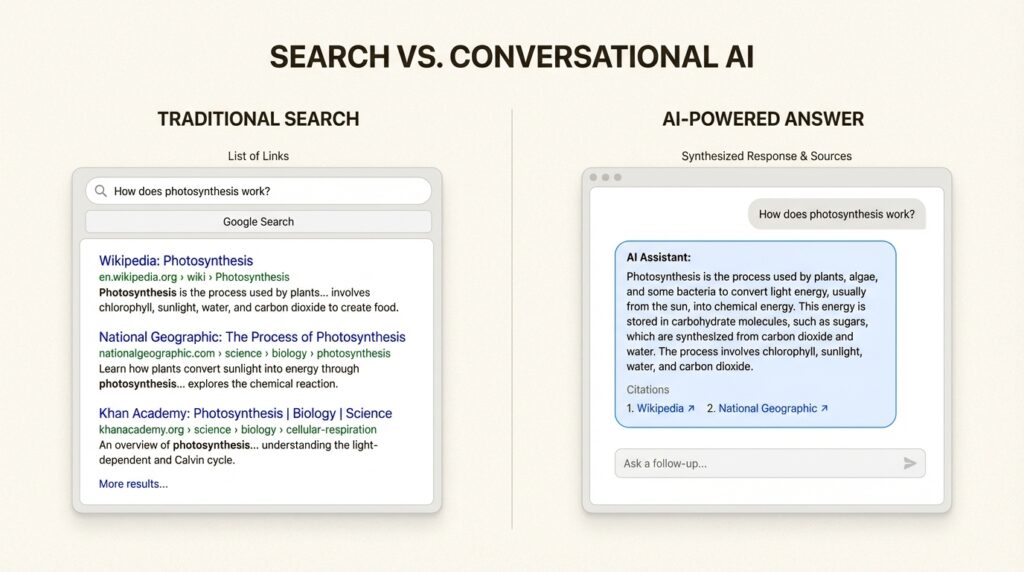
How AI search differs:
AI search engines synthesize information from multiple sources and provide direct answers. They cite sources, but users may never visit your site if the AI answers their question completely.
Structure content for AI citation:
- Provide clear, factual answers to specific questions.
- Cite authoritative sources for claims.
- Use structured data to help AI understand your content.
- Create comprehensive resources that AI engines want to reference.
Long-tail question-based content:
When people search on AI platforms, their queries are often phrased as questions. Targeting these long-tail, question-based keywords increases your chances of appearing in both traditional search results and AI-generated answers.
At Decoding, we’ve developed tools to help businesses track their AI visibility across platforms like ChatGPT and Perplexity. If you’re serious about AI search optimization, learn how to track your AI visibility and understand where your brand appears in AI responses.
For a deeper dive into optimizing for AI search engines, check out our guide to AI search optimization. And if you want to understand how to get your content cited by LLMs, we’ve covered strategies for getting cited by LLMs in detail.
Step 7: Track, measure, and iterate
SEO isn’t a set-it-and-forget-it activity. You need to monitor progress and adjust your strategy.
Key metrics to monitor:
- Impressions: How often your site appears in search results.
- Clicks: How many people actually visit your site.
- Average position: Where your pages rank for target keywords.
- Click-through rate (CTR): Percentage of impressions that result in clicks.
Monthly review process:
Set aside time each month to review your Google Search Console and Analytics data. Look for:
- Which pages are gaining traction
- Which keywords are driving traffic
- Where your rankings are improving (or declining)
- What content resonates with your audience
When to pivot:
If a page isn’t ranking after 3-4 months of optimization, consider:
- Targeting different keywords.
- Improving content depth and quality.
- Building more backlinks to that page.
- Checking for technical issues.
Common mistakes to avoid
Learning from others’ mistakes saves you months of frustration:
Targeting overly competitive keywords too early.
New sites cannot outrank established authorities for competitive terms. Focus on long-tail keywords first, then gradually target more competitive terms as your authority builds.
Neglecting technical SEO basics.
You’d be surprised how many “launched” sites block search engines in their robots.txt or have broken sitemaps. Always verify Google can actually see your site before worrying about content optimization.
Inconsistent content publishing.
Publishing five blog posts one week, then nothing for three months, signals inconsistency to search engines. A steady publishing schedule (even if it’s just one post per week) performs better than sporadic bursts.
Ignoring mobile experience.
With more than half of web traffic coming from mobile devices, a poor mobile experience kills your rankings. Test on actual devices, not just browser emulators.
Expecting overnight results.
SEO is a long game. Six months is the minimum realistic timeline for meaningful results. Anyone promising faster results is either inexperienced or selling something.
Start your SEO journey with confidence
SEO for a new website comes down to seven essential steps: set up your technical foundation, find the right keywords, create optimized content, build authority signals, optimize for performance, plan for AI search, and track your progress.
New sites can absolutely compete with established players. The key is patience, consistency, and focusing on the fundamentals before chasing advanced tactics.
At Decoding, we’ve spent 16 years helping businesses navigate the evolving search landscape. From traditional Google SEO to the new world of AI search visibility, we provide custom strategies tailored to your specific business goals.
If you’re launching a new website and want expert guidance, explore our AI SEO services or request a comprehensive AI visibility audit to understand exactly where your opportunities lie.
The 96.55% of pages that get zero traffic? They either gave up too soon or never built the right foundation. Start with these fundamentals, stay consistent, and you’ll be in the 3.45% that actually gets found.
Frequently Asked Questions
How long does SEO for a new website take to show results?
Expect 6+ months before seeing meaningful traffic from SEO. Some changes might show impact in a few weeks, but significant ranking improvements and traffic growth typically take half a year or more. This timeline varies based on your niche, competition, and how consistently you implement SEO best practices.
What is the most important SEO step for a new website?
Technical foundation comes first. If Google can’t crawl and index your site, nothing else matters. Set up Google Search Console, submit your sitemap, ensure HTTPS is enabled, and verify your site is mobile-friendly before focusing on content and keywords.
Should I do SEO for a new website myself or hire an agency?
You can handle the basics yourself if you have 5-10 hours per week to learn and implement. However, if SEO is critical to your business model or you need faster results, working with an experienced agency like Decoding can accelerate your progress and help you avoid costly mistakes.
Can a new website rank on the first page of Google?
Yes, but typically for long-tail keywords with lower competition first. New sites can rank for specific, targeted queries even against established competitors. Focus on creating the best content for those specific searches rather than trying to compete for broad, highly competitive terms.
How much does SEO for a new website cost?
The basics can be done for free using Google’s tools (Search Console, Analytics, Keyword Planner). Paid tools like Semrush or SE Ranking range from $50-300/month. If hiring an agency, expect $1,000-5,000+ monthly depending on scope and competition in your industry.
Is SEO still worth it for new websites in 2026?
Absolutely. While competition has increased, search remains one of the highest-ROI marketing channels. The key difference in 2026 is that you need to optimize for both traditional Google search and AI search platforms like ChatGPT and Perplexity. New sites that build strong foundations early have significant advantages.






Leave a Reply