

ChatGPT is no longer just answering “what should I buy?”
It’s showing specific products, with prices, reviews, and a “Buy” button, and letting people check out without leaving the chat.
OpenAI’s Instant Checkout now connects ChatGPT to millions of Etsy and Shopify merchants, with PayPal and other payment rails being added on top of Stripe.
If you’re an ecommerce brand, this is the new “page one”:
Can ChatGPT see your products, understand them, and trust them enough to recommend them?
In this guide I will walk you through how ChatGPT Shopping works and what you need to do, across feeds, product detail/description pages (PDPs), reviews, and tracking, to get your products into those recommendation carousels.
What is ChatGPT Shopping, exactly?
When a user types something like:
- “best waterproof hiking boots under $200”
- “coffee grinder for espresso, quiet, fits under cabinet”
ChatGPT can now:
- Detect buying intent.
- Pull a carousel of products with images, titles, price, key pros/cons, and sometimes availability.
- Let the user complete the purchase via Instant Checkout, powered by the Agentic Commerce Protocol (ACP), while you remain the merchant of record.
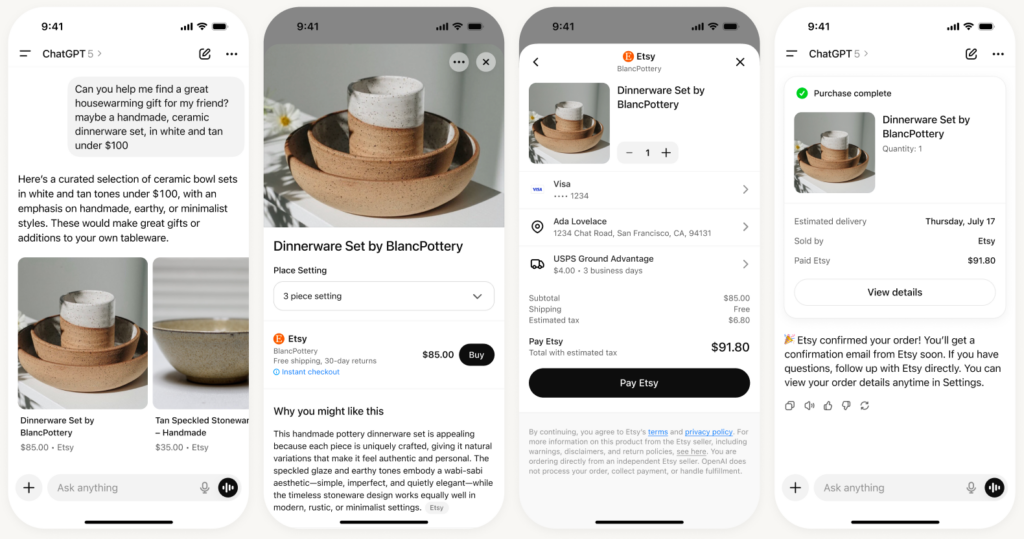
Today, ChatGPT Shopping draws on:
- Product feeds provided directly to OpenAI via its Product Feed Spec.
- Commerce partners (Shopify, Etsy, others) and their shopping graphs.
- Crawled product content, where merchants and platforms allow AI bots to index their pages.
Results are currently organic, no “pay to appear” option.
The ranking logic is driven by relevance, price/value, availability, and trust/quality signals from reviews and brand authority.
Your job isn’t to “hack the algo.”
It’s to make your products the obvious, low-friction answer for the user and for ChatGPT’s retrieval system.
How ChatGPT Shopping actually works
Let’s simplify the pipeline.
User intent detection
ChatGPT classifies the prompt in the following intents:
- Is this research?
- troubleshooting?
- or shopping?
If it’s clearly transactional (“buy”, “shop”, “best X under $Y”), ChatGPT triggers the shopping module instead of a pure text answer.
Product retrieval
ChatGPT builds a candidate set from:
- Your product feed (if you’re integrated with ACP / Instant Checkout).
- Partner feeds from platforms like Shopify and Etsy.
- Publicly crawled PDPs and comparison content where AI bots are allowed.
Ranking & filtering
Products are scored on things like:
- Semantic match to the user’s constraints (use case, budget, form factor).
- Price and value vs similar options.
- Stock + availability (no one wants out-of-stock cards).
- Review volume and sentiment (for summarised pros/cons).
- Whether Instant Checkout is enabled (for one-tap purchasing).
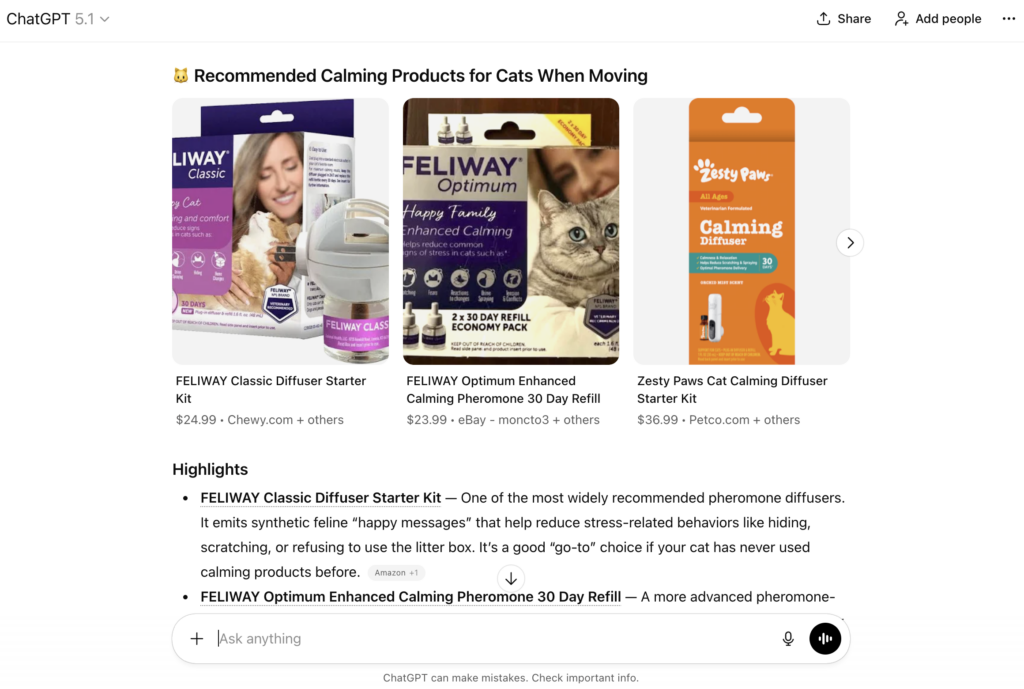
Presentation in the chat ChatGPT then displays a shopping unit:
- Carousel of product cards (image, title, price, short blurb).
- “Buy” or “View details” button.
Under the hood, ACP coordinates the conversation between ChatGPT, the buyer, and your systems so checkout, fulfillment, and support still flow through you.
ChatGPT Shopping vs Google Shopping
| Aspect | ChatGPT Shopping | Google Shopping |
|---|---|---|
| Data source | Merchant feeds to OpenAI + partner platforms + crawled PDPs | Merchant Center feeds + Shopping Graph |
| Placement | Integrated inside conversational answers | SERP widgets, Shopping tab |
| Monetization | Currently organic only | Blend of ads + free listings |
| Checkout | Agentic Commerce Protocol → Instant Checkout | Buy-on-Google (legacy) or merchant checkout |
| Transparency | Limited; user sees card data, not ranking factors | More explicit filters, ratings sources, SERP context |
The important bit for you: this is still SEO, just AI-native. You’re optimizing feeds, PDPs, and reviews for AI retrieval and synthesis instead of just blue links.
Why traditional SEO isn’t enough for ChatGPT Shopping
Classic SEO is built around:
- Keywords → rankings
- Snippets → CTR
- Sessions → conversions
AI shopping flips that:
- Questions & conversations → citations & recommendations.
- The unit of competition isn’t a page, it’s chunks (passages, bullets, tables) that answer sub-questions inside a multi-step reasoning chain.
Generative engines like ChatGPT:
- Fan out a single query into multiple sub-queries (e.g. “best noise-cancelling headphones under $300” → comfort, battery life, mic quality, return policy).
- Retrieve passages from feeds, PDPs, and review content that answer each facet.
- Synthesize those into one coherent recommendation.
That means:
- Ranking for one keyword is less important than covering the full intent surface around your product category.
- You need entity clarity, structured data, and review summaries, not just keyworded prose.
The brands winning in ChatGPT Shopping will be the ones that think like data engineers, not just content publishers.
How to get your products recommended in ChatGPT Shopping
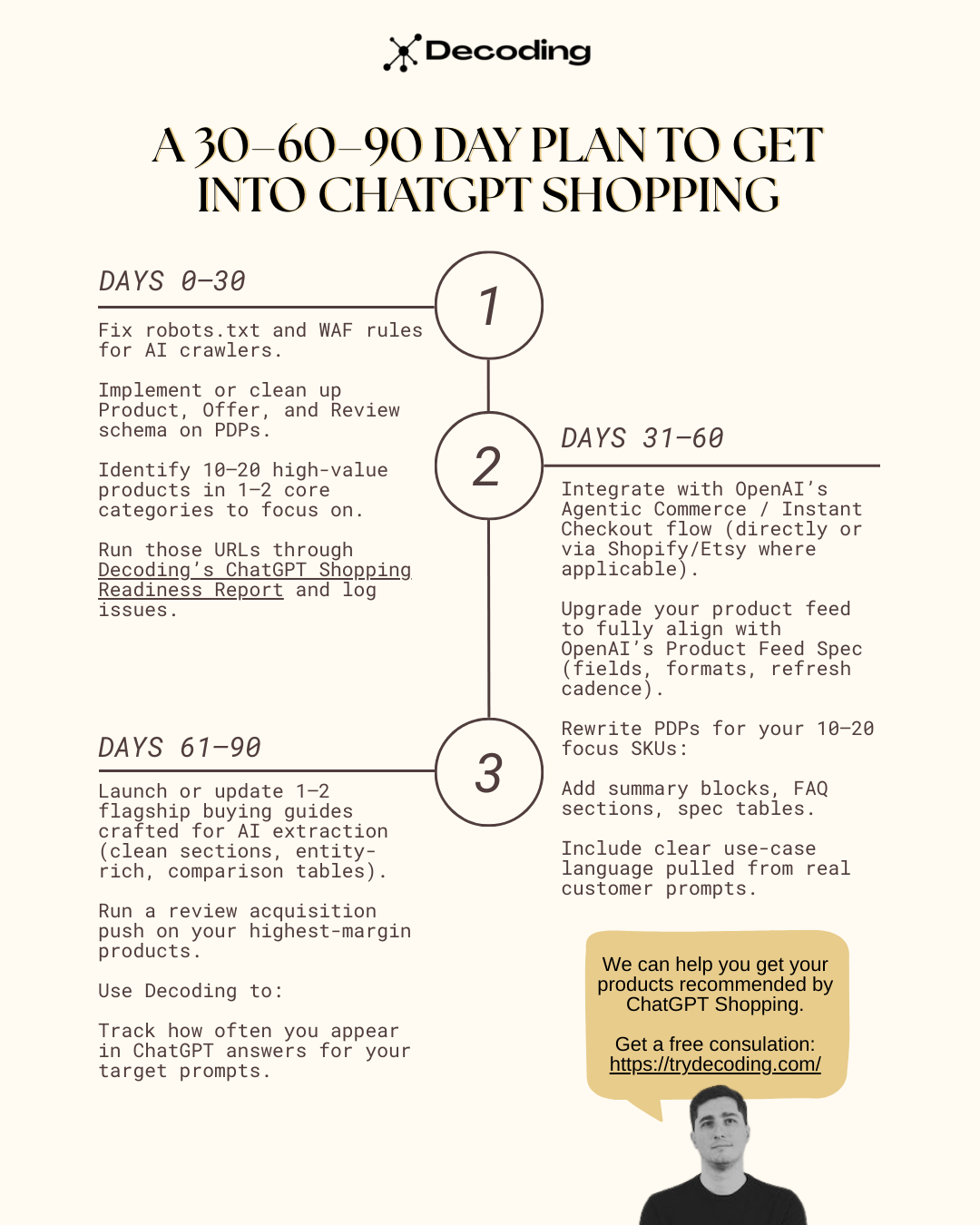
Step 1: Make sure ChatGPT can see your products
Before worrying about ranking, fix eligibility.
Allow OpenAI and AI Crawlers:
- Review
robots.txtand ensure you’re not blocking AI search bots that power generative answers, including OAI-SearchBot and other AI crawlers. - Check your CDN/WAF rules (Cloudflare, Akamai, etc.) so these bots aren’t rate-limited into oblivion.
- Keep your critical resources (HTML, JS needed for content, images) accessible, headless crawlers don’t “click around” like users.
Join OpenAI’s Merchant / ACP Ecosystem:
To fully participate in Instant Checkout:
- Sign up as a merchant via ChatGPT’s merchant portal and connect your commerce stack.
- Implement the Agentic Commerce Protocol endpoints so ChatGPT can:
- Create and update checkout sessions.
- Pass buyer + fulfillment information securely.
- Let you remain the merchant of record.
- Provide a compliant product feed that follows OpenAI’s Product Feed Spec.
If you’re on Shopify or Etsy, much of this will flow through those platforms as they deepen their ACP integrations, but you should still care about feed quality and PDP structure.
Step 2: Engineer a product feed that AI loves
Your feed is effectively an API for how ChatGPT “knows” your catalog.
Non-Negotiable Fields:
OpenAI’s Product Feed Spec outlines a core set of fields that strongly influence whether your products are eligible and understandable in ChatGPT Shopping:
id– stable unique ID per SKU.title– human-readable, constraint-aware (“Waterproof Hiking Boots, Men’s, Wide, Gore-Tex”).description– benefits, use-cases, and constraints in natural language.brand,gtin,mpn.category– mapped to standard taxonomies (e.g. Google product taxonomy).price,sale_price,currency,price_effective_date.availability,inventory_count.image_link,additional_image_link.enable_searchandenable_checkoutflags.review_count,average_rating(if supported).
Treat your feed as the source of truth. ChatGPT will cross-check it against your PDPs and partner feeds, inconsistencies are a trust-killer.
Ranking Boosters in the Feed:
To stand out when there are 20 nearly-identical SKUs:
- Variants & attributes: Add
color,size,material,fit,age_range, etc. Make it easy for ChatGPT to match constraints like “vegan”, “wide feet”, “carry-on compliant”. - Policy + trust fields: Shipping speed bands, returns windows, warranty text. These are the ingredients for lines like, “Free 30-day returns and a 2-year warranty.”
- Rich media: Video URLs, 3D models, and alternate views improve perception and can be surfaced in shopping research flows.
Data Quality Rules:
- Keep prices, stock, and promotions fresh. ACP partners recommend near-real-time updates for fast-moving catalogs.
- Keep naming consistent across your site, marketplaces, and feeds, same product, same name.
- Avoid stuffing feeds with generic adjectives. Write like a salesperson talking to a specific customer, not an AI bot.
Step 3: Turn your PDPs into AI-ready answer surfaces
Feeds get you into the candidate pool. PDPs and supporting content decide if you’re actually recommended.
Design PDPs for Extraction, Not Just Conversion:
Modern AI systems don’t read your entire page. They:
- Break it into passages/chunks.
- Score each chunk for relevance, clarity, and evidence density.
- Lift those chunks into answers.
Practical patterns that help:
- Open with a 40–60 word summary: who it’s for, what it solves, why it’s different.
- Use stable, descriptive headings:
- “Key features”
- “Who this is best for”
- “Specs”
- “Care and maintenance”
- “FAQs”
- Use tables for specs, not prose paragraphs.
- Turn common questions into FAQ blocks (
FAQPageschema) with crisp, one-paragraph answers.
Make Entities Unmistakable:
ChatGPT’s retrieval relies heavily on entities such as: product names, materials, ingredients, brands.
So:
- Introduce the product with its canonical name + key attributes (“Acme Summit GTX Men’s Hiking Boot, Wide Fit”).
- Use consistent naming across PDP, feed, reviews, and comparison guides.
- Implement schema.org
Product,Offer,AggregateRating,Review— rendered in JSON-LD server-side.
Write for Real Prompts, Not Keywords:
Pull prompts from:
- Support tickets and live chat logs.
- Sales calls.
- Reddit threads and niche forums around your category.
Then:
- Answer exact questions like:
- “Is this safe during pregnancy?”
- “Will this fit in an overhead bin?”
- “Is it quiet enough for a small apartment?”
- Build buying guides and comparison pages that target high-intent questions:
- “Best [category] for small kitchens”
- “[Product] vs [product] for beginners”
This aligns with how LLMs break user questions into sub-questions and retrieve focused passages.
Multimodal Readiness:
ChatGPT is rapidly moving from text-only to multimodal shopping research experiences, people will upload photos of their living room and ask what couch fits.
Prepare by:
- Using real-life product photos in context (on-body, in-room, in-use).
- Writing descriptive
alttext that references the scenario (“standing desk in minimalist home office with laptop and external monitor”).
Step 4: Build Off-site trust signals
ChatGPT’s product choices lean on review ecosystems and third-party authority, not just what you say about yourself.
Key levers:
- Review depth & recency: Encourage detailed reviews that mention use-cases, pros, cons, and comparisons. These are gold for AI-generated summaries.
- Independent platforms:
- For software/SaaS: G2, Capterra, TrustRadius.
- For local and physical products: Google Reviews, Yelp, niche vertical sites.
- Topical authority content: Publish long-form, well-structured guides (often ~2,000–3,000+ words) that cover your category in depth, they’re disproportionately cited in AI answers.
- Digital PR & entity mentions: Get your brand and hero products mentioned on relevant, high-trust domains. The number of referring domains and domain-level trust are strong predictors of citation frequency in AI systems.
Step 5: Monitor and measure your AI visibility
Here’s the uncomfortable truth: there is no native “Search Console for ChatGPT”. You have to build an approximation.
The GEO community breaks this down into three layers:
- Eligibility: Can AI systems crawl and index your content/feeds?
- Visibility: Are you appearing in the generative layer (ChatGPT answers, shopping units)?
- Performance: Are those appearances driving traffic, signups, or revenue?
What to track manually?
- Referrers in analytics: Segment visitors coming from chat.openai.com, chatgpt.com, or openai.com. They’re still small but growing, and tend to be higher-intent.
- Prompt libraries: Maintain a list of prompts your customers are likely to use. Run them regularly in ChatGPT:
- Track whether your brand, products, or guides are mentioned.
- Note how they’re described (positioning, sentiment, comparisons).
- Screenshot and log shopping carousels for key prompts so you can see which competitors are showing up over time.
Using Decoding to Automate This?
This is exactly the problem we built Decoding for.
Decoding is an AI visibility tracking & optimization platform focused on ChatGPT and major LLMs.
For ecommerce and brand teams, Decoding lets you:
- Track your visibility in ChatGPT
- Add custom prompts by funnel stage (top, mid, bottom).
- See when your brand, products, or competitors are mentioned in answers and shopping flows.
- Store every answer historically for comparison over time.
- Monitor sentiment & positioning
- Automatic sentiment analysis for your brand vs competitors.
- See if ChatGPT is recommending you, warning against you, or ignoring you.
- Audit product + content readiness
- Use our free ChatGPT Shopping Readiness Report to analyze individual PDPs, structured data, imagery, metadata, and pricing, and get a simple readiness score with remediation steps.
- Export-ready reporting
- Export findings to PDF/CSV for client decks or internal stakeholders.
You can start with a 7-day free trial, no need to rebuild your analytics stack just to know if ChatGPT is helping or hurting you.
Final thoughts
ChatGPT Shopping is not a side-channel.
It’s the beginning of agentic commerce: users describing what they want in natural language and AI agents doing the heavy lifting, research, comparison, and checkout.
You don’t control the interface. You do control:
- How clean and rich your product feed is.
- How extractable and trustworthy your PDPs are.
- How strong your review and authority signals look across the web.
- Whether you’re actually monitoring your AI visibility or flying blind.
If you want help:
- Auditing your current eligibility for ChatGPT Shopping
- Engineering feeds and PDPs for AI retrieval (not just humans)
- Tracking your visibility vs competitors in ChatGPT answers
👉 Start a 7-day free trial of Decoding or book a call with us (founders)


Leave a Reply