


HTTP redirects keep the internet functioning when URLs change, pages move, and websites evolve. Use the wrong redirect type and you could hemorrhage SEO value, confuse search engines, or break user experiences entirely.
This guide breaks down exactly what redirect types and codes you need to know, when to use each one, and how to implement them correctly.
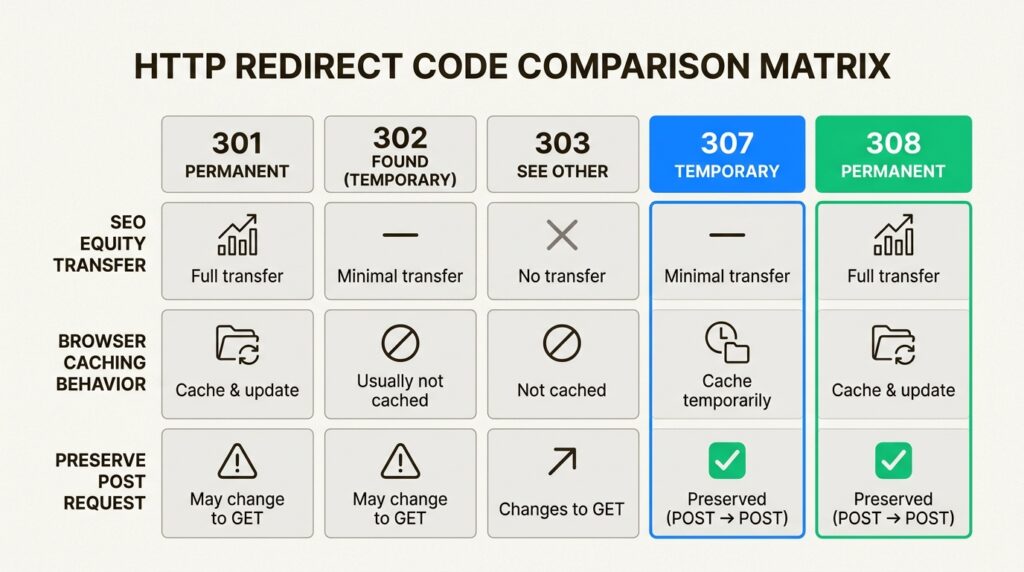
What are HTTP redirects and why do they matter?
An HTTP redirect is a 3xx status code that tells browsers and search engines a resource has moved to a new location. Think of it like a change of address form for the web. When someone requests an old URL, the server responds with a redirect code and the new destination, automatically forwarding the request.
This matters for two critical reasons:
User experience: Without redirects, users hitting changed URLs would see 404 errors. That’s a dead end that frustrates visitors and sends them back to search results.
SEO preservation: Redirects transfer link equity (ranking power) from old URLs to new ones. A proper 301 redirect passes 95-99% of the original page’s authority, according to Moz. Without it, you’re essentially starting from zero with every URL change.
There’s also a growing third consideration: AI search visibility. As LLM crawlers from ChatGPT, Claude, and Perplexity index the web, clean redirect architecture ensures these systems can properly trace your content relationships and cite your brand accurately.
The five essential redirect status codes explained
Not all redirects are created equal. Each 3xx code sends different signals to browsers and search engines about the nature and duration of the move.
301 Moved Permanently
The 301 is your default choice for permanent URL changes. It tells search engines the original URL is gone for good and the new location should replace it in the index.
Here’s what happens under the hood:
- Search engines transfer the vast majority of link equity to the target URL
- The new URL becomes the canonical version
- Browsers cache 301s aggressively, which can make them difficult to reverse
Use a 301 when you’re:
- Migrating to a new domain
- Permanently restructuring your URL architecture
- Consolidating duplicate content
- Moving from HTTP to HTTPS
One caveat from Google’s documentation: search engines take time to process 301s. If the original page rarely gets crawled or the new URL has technical issues, the transfer of authority can take weeks or months.
302 Found (Temporary Redirect)
The 302 signals a temporary relocation. The original URL stays indexed, and search engines expect it to return.
Key characteristics:
- Does not pass link equity by default
- Original URL remains in search results
- Google may treat long-term 302s (6+ months) as 301s
Use cases include:
- Temporary promotional pages
- A/B testing different page versions
- Short-term maintenance pages
- Geographic or device-based redirects
The risk with 302s is misuse. We’ve seen sites accidentally use 302s for permanent moves, then wonder why their rankings never recovered. If the change is permanent, use a 301.
307 Temporary Redirect
The 307 is HTTP/1.1’s replacement for the 302, with one crucial difference: it guarantees the HTTP method won’t change during the redirect.
What this means practically:
- A POST request stays a POST request
- The request body is preserved
- Explicitly temporary, like the 302
The 307 matters most for form submissions and API calls where you need to redirect temporarily without breaking the request. For standard web pages, most SEOs still default to 302 since search engine handling of 307s remains less documented.
One place you’ll commonly see 307s: HSTS (HTTP Strict Transport Security) internal redirects. When a browser knows a site uses HSTS, it internally redirects HTTP requests to HTTPS using a 307 before the request even hits the server.
308 Permanent Redirect
The 308 combines the permanence of a 301 with the method preservation of a 307. It’s the HTTP/1.1 permanent counterpart to the 307.
Characteristics:
- Permanent redirect that passes link equity
- Preserves HTTP method (POST stays POST)
- Growing adoption for APIs and form-based workflows
Use a 308 when you need to permanently redirect while preserving the original request method. This is particularly relevant for API endpoints where a 301 might cause a POST to become a GET, breaking the integration.
Search engine support for 308s is solid, though 301 remains the safer, more universally understood choice for standard web content.
303 See Other
The 303 is specialized. It forces the browser to use a GET request for the follow-up, regardless of what method started the process.
This enables the POST-Redirect-GET pattern:
- User submits a form via POST
- Server processes the form and responds with 303 to a confirmation page
- Browser requests the confirmation page using GET
- User can refresh without resubmitting the form
From an SEO perspective, 303s rarely matter because search engines don’t submit forms. But for web applications handling user input, they’re essential for preventing duplicate submissions.
How to choose the right redirect type
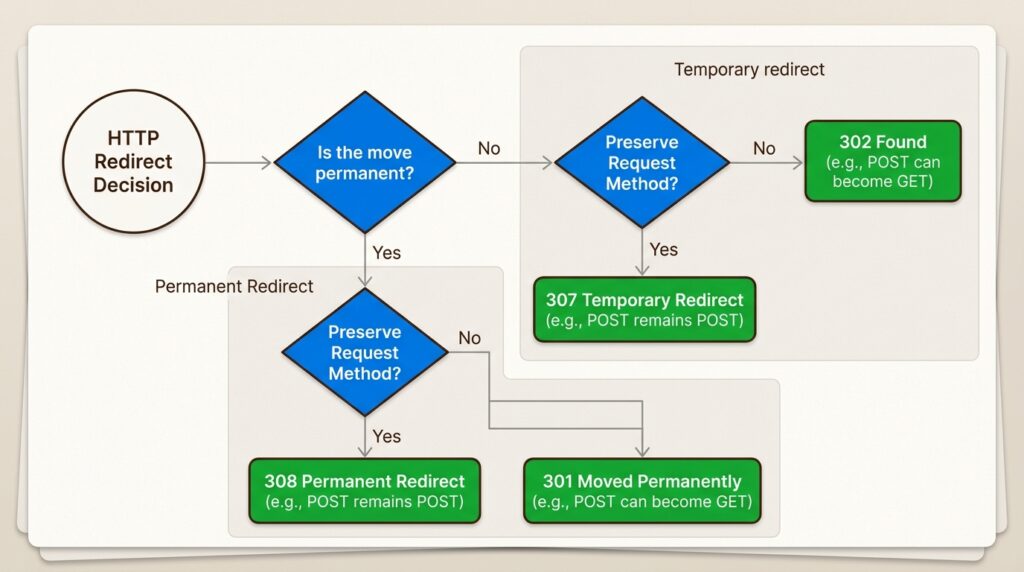
Here’s how to simplify the decision process. When you’re staring at your server configuration wondering which code to use, ask yourself two questions:
Is this permanent or temporary?
- Permanent (URL A is gone forever): 301 or 308
- Temporary (URL A will return): 302 or 307
Does the HTTP method need to be preserved?
- Yes (POST must stay POST): 307 (temporary) or 308 (permanent)
- No (standard web pages): 302 (temporary) or 301 (permanent)
For most SEO scenarios, the decision tree is even simpler:
- Permanent page move: Use 301
- Temporary page move: Use 302
The 307 and 308 matter primarily for developers working with forms, APIs, or complex request flows where method preservation prevents bugs.
Common mistakes to avoid:
- Using 302 for permanent changes (leaves equity on the table)
- Not updating internal links after implementing redirects (creates unnecessary redirect chains)
- Redirecting everything to the homepage (triggers soft 404s)
Server-side vs client-side redirects
How you implement redirects matters almost as much as which code you choose.
Server-side redirects (recommended)
Server-side redirects use HTTP 3xx status codes returned directly from the server. They’re the gold standard for several reasons:
- SEO reliability: Search engines follow them without issue
- Speed: No additional page load or JavaScript execution required
- User experience: Back button works normally
- Predictability: Behavior is consistent across browsers
Every redirect we’ve discussed so far (301, 302, 307, 308, 303) is a server-side redirect when implemented via HTTP headers.
Client-side redirects (avoid when possible)
Client-side redirects happen in the browser after the page starts loading. They come in two flavors:
Meta refresh: An HTML tag that triggers after a specified delay:
<meta http-equiv="refresh" content="0; url=https://example.com/new">Google treats instant meta refreshes (0 seconds) similarly to 301s and delayed refreshes as temporary redirects. But they’re slower, break the back button, and aren’t universally supported.
JavaScript redirects: Code that changes the window location:
window.location.href = "https://example.com/new";JavaScript redirects require the page to load and execute code before the redirect happens. Search engines may not follow them reliably, and they create a poor user experience.
When are client-side redirects acceptable? Only when you lack server access. If you can configure server-side redirects, you should.
Implementing redirects: Code examples
Here’s how to implement the most common redirect scenarios across different platforms.
Apache (.htaccess)
Simple 301 redirect:
Redirect 301 /old-page /new-pageUsing mod_rewrite for more control:
RewriteEngine on
RewriteRule ^old-page$ /new-page [R=301,L]
Force HTTPS and www:
RewriteEngine on
RewriteCond %{HTTPS} off
RewriteRule ^(.*)$ https://%{HTTP_HOST}%{REQUEST_URI} [R=301,L]

RewriteCond %{HTTP_HOST} !^www\.
RewriteRule ^(.*)$ https://www.%{HTTP_HOST}%{REQUEST_URI} [R=301,L]
Nginx
Basic 301 redirect:
location = /old-page {
    return 301 /new-page;
}
Using rewrite for pattern matching:
rewrite ^/old-page$ /new-page permanent;Force HTTPS:
server {
    listen 80;
    server_name example.com;
    return 301 https://$server_name$request_uri;
}
PHP
301 redirect with proper headers:
<?php
header("HTTP/1.1 301 Moved Permanently");
header("Location: https://example.com/new-page");
exit();
?>
302 temporary redirect:
<?php
header("HTTP/1.1 302 Found");
header("Location: https://example.com/temporary-page");
exit();
?>
The exit() is critical. Without it, PHP continues executing code after sending headers, which can cause unexpected behavior.
WordPress plugins
If you’re on WordPress and don’t want to edit server files, plugins like RankMath, Yoast SEO, and AIOSEO provide redirect management interfaces. They’re convenient but slightly slower than server-level redirects since WordPress has to load before processing them.
Redirect best practices for SEO
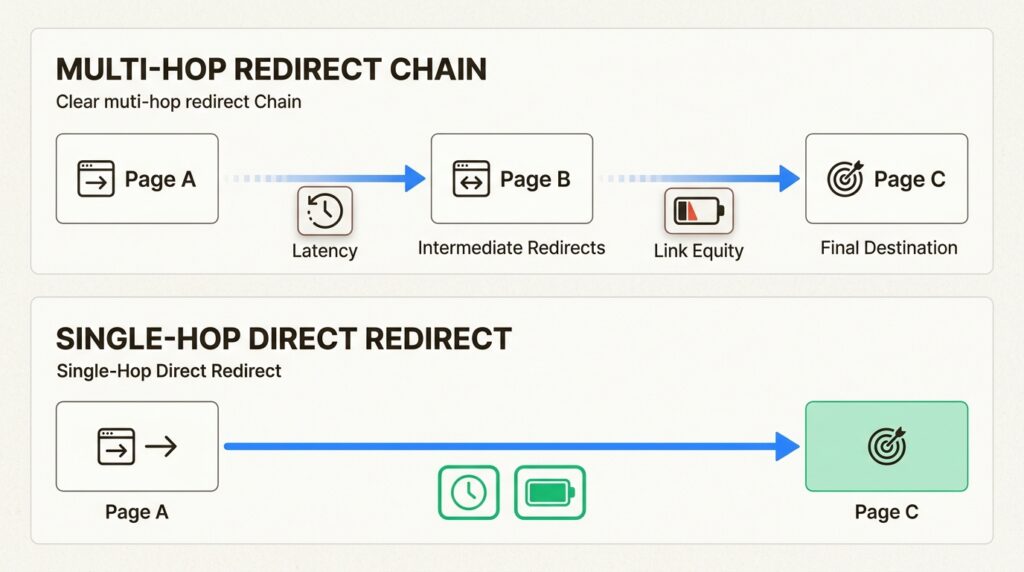
Getting redirects right isn’t just about choosing the correct status code. Follow these practices to preserve your SEO value:
Avoid redirect chains. When URL A redirects to B, which redirects to C, which redirects to D, you’ve created a chain. Google typically follows only 5 redirects before giving up. Each hop also dilutes link equity. Redirect directly from A to D whenever possible.
Redirect to relevant pages. Sending all 404s to your homepage might seem convenient, but Google treats this as a soft 404. The redirect target should match the original content’s intent. If you delete a product page, redirect to the category page or a similar product, not the homepage.
Update internal links. After implementing redirects, scan your site for internal links pointing to the old URLs and update them. Internal redirects waste crawl budget and slow down page loads.
Choose your canonical URL format. Decide on your preferred URL structure (www vs non-www, HTTPS, trailing slashes) and redirect all variations to your chosen format. Consistency prevents duplicate content issues.
Monitor and clean up. Old redirects accumulate over time. Periodically audit your redirect rules and remove any that no longer receive traffic or inbound links. Tools like Screaming Frog can help identify unnecessary redirects.
Test before deploying. Always verify redirects work as expected before pushing to production. Check both the status code returned and the final destination URL.
Common redirect mistakes to avoid
Even experienced developers make these errors:
Redirect loops. URL A redirects to B, which redirects back to A. Browsers detect this and show an error, but not before frustrating users. Always verify your redirect logic doesn’t create circular references.
The “homepage redirect” trap. When you don’t have a relevant page for a deleted URL, sending users to the homepage feels like a solution. It’s not. Google sees this as a soft 404 and won’t pass link equity. Better to serve a proper 404 page with helpful navigation.
Using 302 for permanent changes. We’ve mentioned this before, but it bears repeating. A 302 left in place for months signals uncertainty to search engines. If the change is permanent, use a 301.
Ignoring mobile considerations. If you maintain separate mobile and desktop sites, implement redirects carefully. Sending desktop users to mobile URLs (and vice versa) creates a poor experience. Responsive design is the better long-term solution.
Forgetting about redirect latency. Every redirect adds a round-trip to your page load time. While a single redirect is negligible, chains add up. Monitor your site’s redirect performance, especially on mobile connections.
Optimize your redirect types and codes for AI search visibility
As search evolves beyond traditional Google results, redirect architecture impacts how AI systems discover and cite your content. LLM crawlers from ChatGPT, Perplexity, and Claude follow redirects differently than Googlebot, and messy redirect structures can cause these systems to miss your content entirely or attribute it incorrectly.
Clean, well-documented redirect types and codes help AI crawlers:
- Trace content relationships across URL changes
- Understand your site’s information architecture
- Attribute citations to the correct canonical URLs
At Decoding, we’ve built an AI Visibility tool that tracks how your brand appears across LLMs and identifies redirect-related issues that might be hurting your AI search presence. The tool monitors whether AI systems can properly follow your redirects and surface your content in responses.
The bottom line? Redirects aren’t just about Google anymore. A solid redirect strategy supports visibility across the entire search ecosystem, from traditional engines to emerging AI platforms.
Frequently Asked Questions
What are the most common redirect types and codes I need to know?
For most use cases, you only need to understand 301 (permanent) and 302 (temporary) redirects. The 307 and 308 codes matter primarily for developers working with forms or APIs where HTTP method preservation is critical.
How do redirect types and codes affect my SEO rankings?
301 redirects pass 95-99% of link equity to the target URL, making them essential for preserving rankings during URL changes. 302 redirects don’t pass equity initially, which is why using them for permanent moves can hurt your SEO performance.
Can I use JavaScript redirects instead of HTTP redirect types and codes?
You can, but you shouldn’t for SEO-critical pages. JavaScript redirects require the page to load and execute code before redirecting, which search engines may not follow reliably. Always use server-side HTTP redirects when possible.
What’s the difference between 301 and 308 redirect types and codes?
Both are permanent redirects, but 308 preserves the original HTTP method (POST stays POST) while 301 may change it to GET. For standard web pages, 301 is the safer, more widely supported choice.
How many redirect types and codes should I implement on my site?
Minimize redirects wherever possible. While they’re necessary for URL changes, every redirect adds latency. Audit your site regularly and remove redirects that no longer receive traffic or inbound links.
Do redirect types and codes impact AI search visibility?
Yes. Clean redirect architecture helps LLM crawlers properly trace your content and attribute citations correctly. Messy redirect structures can cause AI systems to miss your content or attribute it to the wrong URLs.






Leave a Reply