


You open Google Search Console and see it: dozens, maybe hundreds of pages labeled “crawled currently not indexed.” Your content is live, Googlebot has visited, but your pages aren’t showing up in search results.
This status is one of the most common indexing issues site owners face. The good news? It’s usually fixable. The key is understanding why Google crawled your pages but chose not to index them, then taking targeted action to address those specific issues.
Let’s break down what this status actually means and how to resolve it.
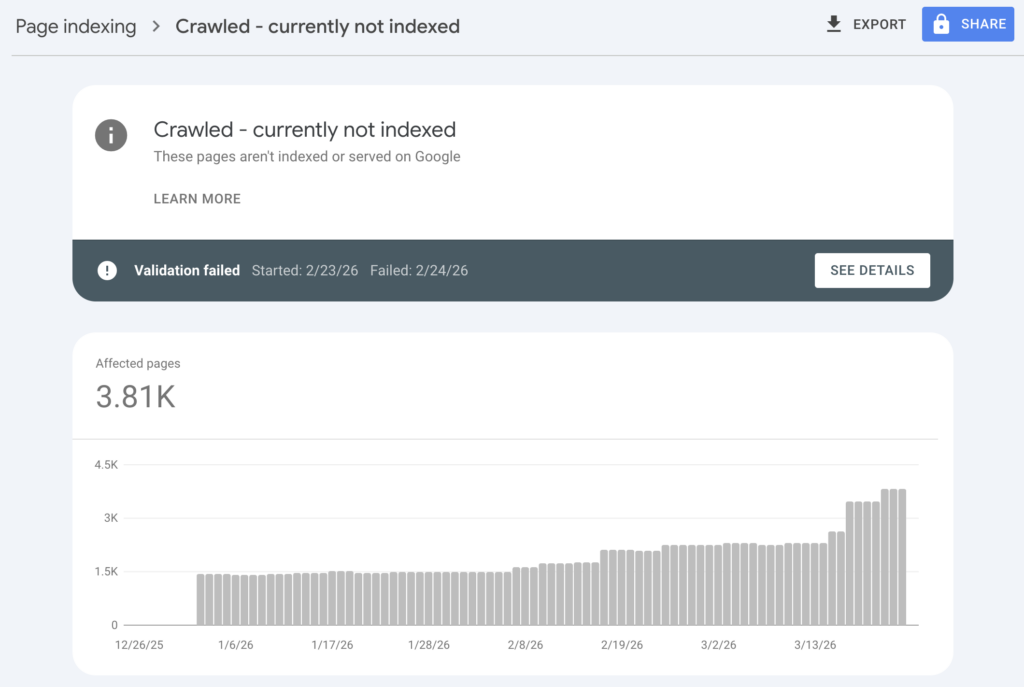
What does it mean “crawled currently not indexed” in GSC?
When Googlebot visits a page and analyzes its content, that page enters the “crawled” state. If Google decides the page doesn’t meet its quality or relevance thresholds, it applies the “currently not indexed” label. The page exists in Google’s crawl records but not in its search index.
This is fundamentally different from “discovered currently not indexed.” With “discovered,” Google knows your URL exists (perhaps from your sitemap or an internal link) but hasn’t actually crawled it yet. That’s typically a crawl budget or queue issue. “Crawled” means Google has already evaluated your page and made a deliberate decision not to index it.
Here’s the short version: this isn’t an error. Google doesn’t index every page on the internet. Its storage is finite, and it filters aggressively to maintain search quality. Some pages simply don’t make the cut.
But when important pages, ones you want ranking and driving traffic, get stuck in this status, you need to take action.
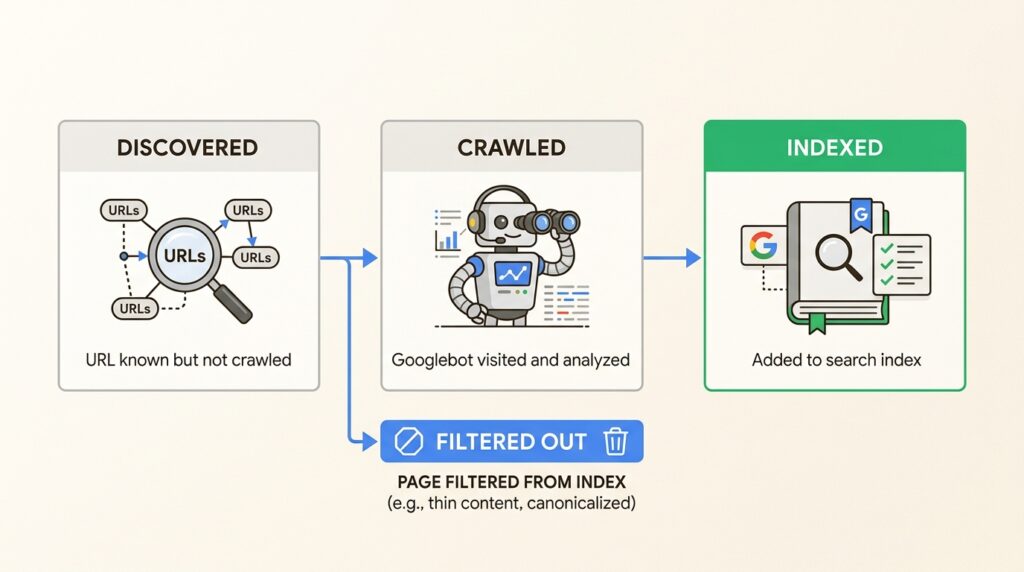
Why Google crawls but doesn’t index pages
Understanding the root causes helps you prioritize fixes. The reasons generally fall into three categories.
Content quality issues
Google’s algorithms evaluate whether your content provides genuine value. Pages often fail this test due to:
- Thin content: Pages with substantially less information than competing results. If top-ranking articles cover a topic in 2,000 words and your page has 300, Google may see yours as incomplete.
- Duplicate or near-duplicate content: When multiple pages on your site (or across the web) cover the same ground, Google typically indexes only the version it deems most authoritative. Your page might be the one filtered out.
- Search intent mismatch: Your content might be well-written but answer the wrong question. If someone searches “how to calculate taxes” and your page is a tax calculator tool while Google surfaces guides and videos, there’s a mismatch.
Technical and structural problems
Even quality content can fail to index due to technical signals:
- Weak internal linking: Pages with no incoming internal links (orphan pages) signal low importance to Google. If the only way to find a page is through your sitemap, Google assumes it has low value.
- Conflicting signals: Accidental noindex tags, incorrect canonical tags pointing elsewhere, or robots.txt blocking can all prevent indexing. These are often implementation errors rather than quality judgments.
- Site-wide quality concerns: As Google’s John Mueller noted, “You can’t force pages to be indexed. It’s not an issue with ‘that page’, it’s more site-wide.” If your domain has a history of low-quality content, even your better pages may struggle to get indexed.
Special cases
Some pages legitimately shouldn’t be indexed:
- Out-of-stock e-commerce products: Google avoids surfacing unavailable products
- Pagination pages: Page 2, 3, 4 of blog listings rarely need individual indexing
- RSS feeds and internal search results: These serve functional purposes, not search value
- Redirect destination URLs: Technical URLs that exist for redirects but aren’t standalone content
Step-by-step fixes to get pages indexed
Here’s a practical framework for resolving indexing issues, ordered by impact.
Step 1: Verify the issue with URL Inspection
Before making changes, confirm the problem actually exists. Google Search Console data can lag by days or even weeks.
First, check the URL Inspection Tool for a specific affected page. Look at the “Page indexing” section. If it says “URL is not on Google,” the page genuinely isn’t indexed.
Next, verify with a site search. Go to Google and search `site:yourdomain.com/page-url`. If nothing appears, the page is definitely not indexed.
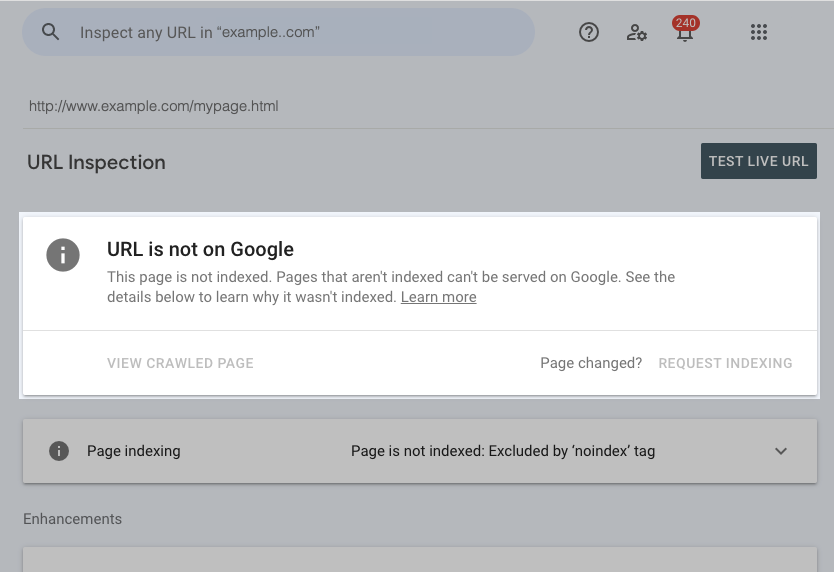
Important: The URL Inspection Tool often shows more recent data than the Page Indexing report. A page listed as “crawled not indexed” in the report might actually be indexed when you check the live URL. Always verify before investing time in fixes.
Step 2: Improve content quality
If your page truly isn’t indexed, start with content. This is the most common cause and the hardest to fix, but also the most impactful.
Audit your page against the top 3-5 ranking results for your target keyword. Ask honestly:
- Does my content fully answer the user’s question?
- Do I provide information or insights not found in competing pages?
- Is my content more comprehensive, more up-to-date, or more useful?
If the answer is no, expand and improve. Add depth, original research, helpful examples, or expert insights. Don’t just add words. Add value.
For e-commerce product pages, ensure descriptions are unique and detailed. For blog content, cover topics thoroughly rather than superficially. Google’s Quality Raters Guidelines emphasize expertise, authoritativeness, and trustworthiness (E-E-A-T). Demonstrate all three.
Step 3: Strengthen internal linking
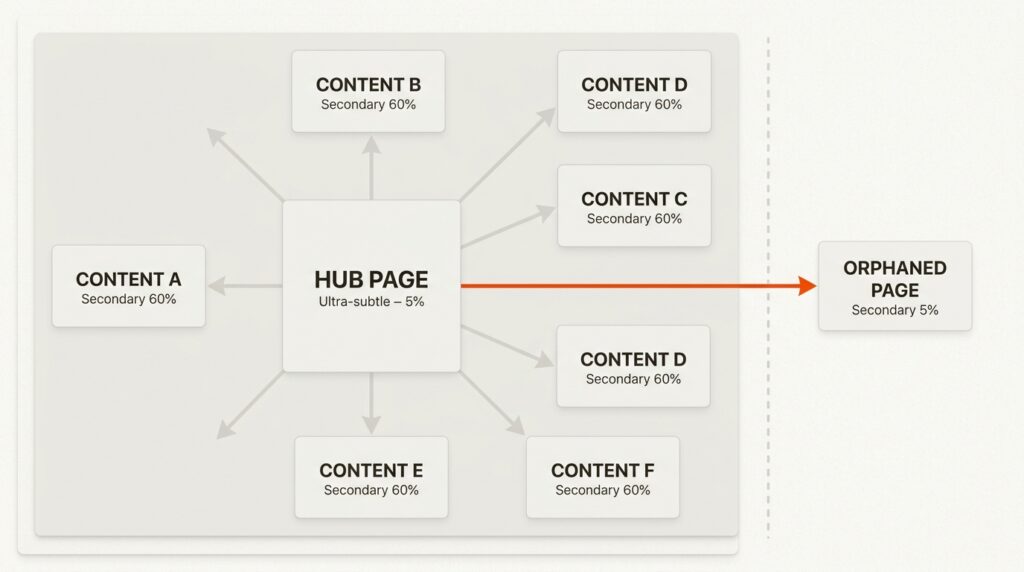
Google discovers and evaluates pages partly through your internal link structure. Orphan pages, those with no internal links pointing to them, signal low importance.
Find pages on your site that already rank well or have high authority. Identify sections where linking to your non-indexed page would add value for readers. Add contextual internal links with descriptive anchor text.
A quick way to find internal linking opportunities: search Google for `site:yourdomain.com “target keyword of non-indexed page”`. This surfaces pages on your site that already mention the keyword, making them natural candidates for internal links.
Step 4: Resolve duplicate content
If your page is similar to others (on your site or elsewhere), Google may be choosing a different version to index.
Check if canonical tags are implemented correctly. The canonical tag should point to the version you want indexed. Ensure your XML sitemap contains only canonical URLs, not duplicates.
If you have multiple pages covering similar topics, consider consolidating them. One comprehensive page typically outperforms several thin ones.
Step 5: Request re-indexing
After making meaningful improvements, tell Google to recrawl your page.
Use the URL Inspection Tool in Google Search Console. Enter your URL, then click “Request Indexing.” This adds your page to Google’s priority crawl queue.
Set realistic expectations. Requesting indexing without making improvements rarely works. And even with fixes, indexing can take days or weeks. As John Mueller noted, “Making significant quality changes across a site takes time to be picked up. These things often take several months to be reprocessed and reevaluated.”
When to leave pages as “crawled not indexed”
Not every page needs indexing. In fact, some pages shouldn’t be indexed.
Leave pages in this status if they:
- Serve navigation or filtering purposes (pagination, faceted search)
- Are development, staging, or admin pages
- Duplicate content that exists for technical reasons
- Have no realistic potential to drive organic traffic
Focusing your crawl budget on high-value pages helps your important content get indexed faster. Don’t waste energy trying to index pages that don’t serve a search purpose.
How this affects your AI search visibility
ChatGPT, Claude, Perplexity, and other AI systems rely on indexed web content to generate responses and cite sources. If your pages aren’t indexed, they can’t be discovered by these systems. You’re invisible in the emerging AI search landscape.
But it’s more than just being indexed. AI systems prioritize high-quality, authoritative content, the same signals Google uses. The fixes that get you indexed in Google (better content, stronger internal linking, clear site structure) also improve your chances of being cited by AI.
Start fixing your indexing issues today
The “crawled currently not indexed” status is frustrating but solvable. Here’s your action plan:
- Verify the issue with URL Inspection and site search
- Audit and improve content quality against competitors
- Strengthen internal linking to signal page importance
- Resolve duplicate content with canonical tags
- Request re-indexing after meaningful improvements
Remember: not every page needs indexing. Focus your efforts on high-value pages with genuine traffic potential. Quality beats quantity in both Google’s index and AI citations.
If you need help diagnosing indexing issues or building a site that performs in both traditional and AI search, explore our Generative Engine Optimization services. We help businesses dominate Google and AI search through technical excellence and content quality.
Frequently Asked Questions
How long does it take to fix “crawled currently not indexed”?
It depends on the cause. Technical fixes (removing noindex tags, fixing canonicals) can resolve within days after requesting re-indexing. Content quality improvements typically take weeks to months for Google to recognize and reward.
Can I force Google to index my pages?
No. As Google’s John Mueller stated, “You can’t force pages to be indexed.” You can only make your pages as index-worthy as possible and request that Google reconsider. The decision ultimately rests with Google’s algorithms.
Why are some of my pages indexed while similar ones are not?
Google evaluates pages individually. Slight differences in content quality, internal linking, or user engagement signals can lead to different indexing decisions. Review the indexed pages to understand what Google values, then apply those lessons to non-indexed pages.
Does “crawled currently not indexed” mean my site has a penalty?
No. This is not a penalty. It’s a quality filtering decision. Your site isn’t being punished; specific pages simply don’t meet Google’s indexing thresholds. Focus on improving those pages rather than worrying about penalties.
How do I know if my indexing issues are affecting AI search visibility?
If your pages aren’t indexed by Google, they can’t be discovered by most AI systems. To check your AI visibility specifically, query ChatGPT, Claude, or Perplexity about topics you cover. If your brand isn’t cited, you likely have both indexing and AI visibility issues.
Should I delete pages that stay “crawled not indexed” for months?
Not necessarily. If the pages serve a purpose for your users (navigation, internal reference), keep them but add a noindex tag to clean up your index coverage report. If they were meant to drive traffic but never will, consider consolidating or removing them to improve your site’s overall quality signal.





Leave a Reply