


When you’re structuring a website, one decision carries more weight than most people realize: where to put your content. Should your blog live at blog.yoursite.com or yoursite.com/blog? This seemingly small choice can affect your search visibility in meaningful ways.
Let’s break it down.
What is a subdomain?
A subdomain is a prefix added to your domain name that creates a separate section of your website. Think of your domain as a building and subdomains as different wings. Each has its own entrance, but they’re all part of the same property.
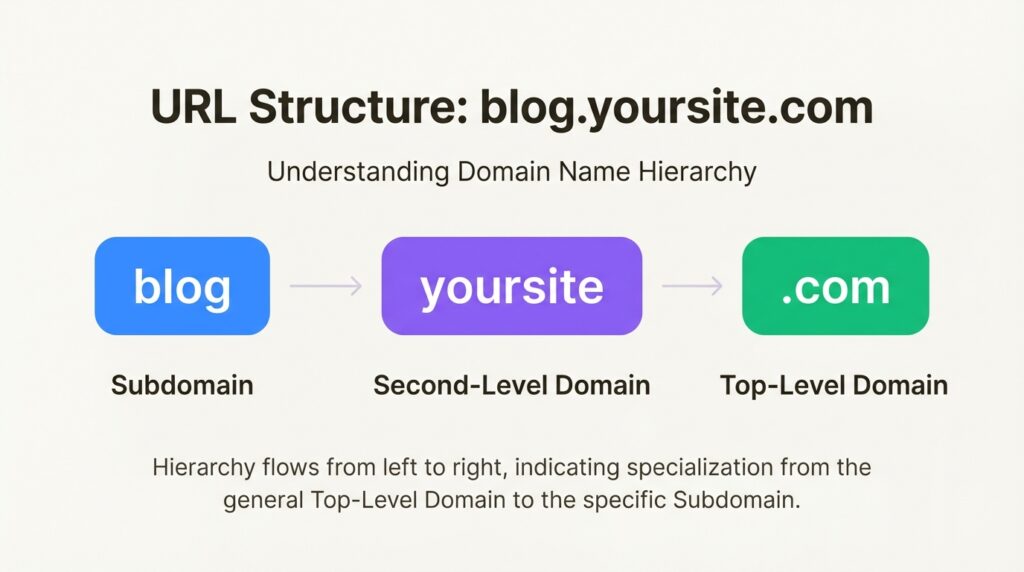
Here’s how URL structure breaks down:
- Top-Level Domain (TLD): The extension like .com, .org, or .net
- Second-Level Domain (SLD): Your unique domain name (yoursite)
- Subdomain: The prefix before your domain (blog., shop., help.)
So in blog.yoursite.com, “blog” is the subdomain. In yoursite.com/blog, “/blog” is a subdirectory (or subfolder). The difference matters more than you think.
Technically, subdomains work through DNS records, specifically CNAME records that point the subdomain to a specific server or location. This lets you host subdomain content separately from your main site if needed.
If you’re just getting started with website structure, our guide on SEO for new websites covers the fundamentals you need.
How subdomains affect SEO
Here’s the short version: Google treats subdomains as separate websites. Not extensions of your main site. They’re separate entities entirely.
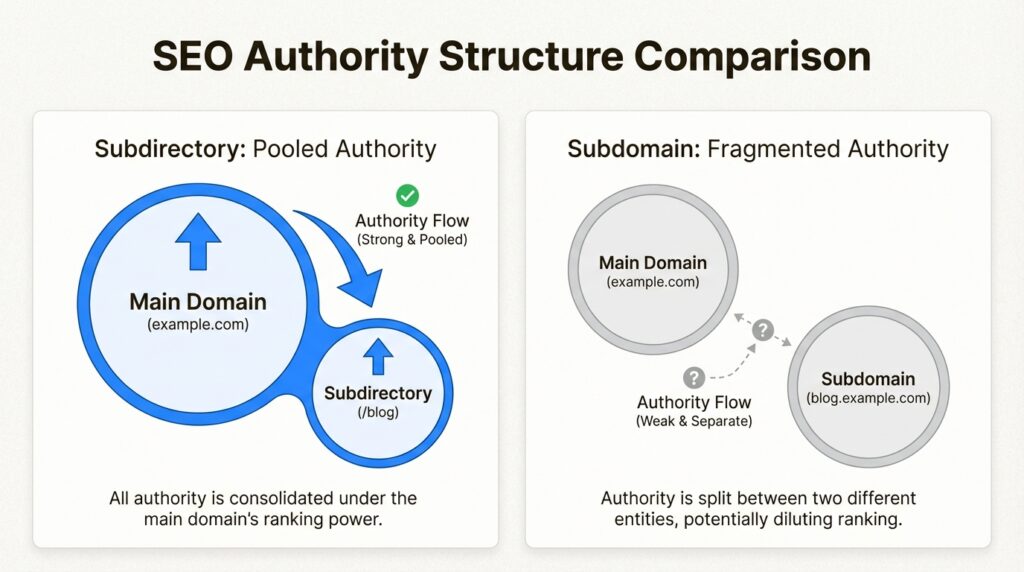
This has several implications for your SEO strategy:
Domain authority fragmentation. When you create a subdomain, it doesn’t inherit your main domain’s authority. If yoursite.com has a Domain Authority of 60, blog.yoursite.com starts from scratch. It needs to build its own backlink profile, earn its own trust signals, and climb the rankings independently. According to Moz’s research on domain authority, subdomains typically start with their own DA score separate from the main domain.
Backlink dilution. Links pointing to your subdomain don’t help your main domain’s authority. If a major publication links to blog.yoursite.com, that link juice stays with the subdomain. It doesn’t flow back to yoursite.com. SE Ranking’s analysis confirms that subdomains are crawled and indexed independently from the main domain.
Keyword cannibalization risks. If your subdomain and main domain target similar keywords, they can end up competing against each other in search results. Google sees them as separate sites, so it doesn’t know they’re related. You might end up cannibalizing your own rankings. Neil Patel’s guide on subdomain SEO explains this competition dynamic in detail.
Double the SEO work. Each subdomain needs its own content strategy, technical optimization, and link building. You’re essentially managing multiple websites instead of one consolidated property.
The data backs this up. When Salesforce moved their blog from a subdomain to a subdirectory, organic traffic doubled overnight. Similar stories from Yelp’s migration and Monster’s restructuring show the same pattern: consolidating content under the main domain typically boosts overall visibility.
Subdomain vs. subdirectory: which is better for SEO?
Google’s official stance, via Search Advocate John Mueller, is that “Google websearch is fine with using either subdomains or subdirectories. I recommend picking a setup that you can keep for longer.”
But here’s the thing: Google’s algorithm and SEO best practices aren’t always the same thing. While Google can rank subdomains effectively, the practical reality is that subdirectories usually perform better.
When subdirectories win
Subdirectories (yoursite.com/blog) consolidate all your SEO efforts into one domain. Every blog post, every backlink, every piece of content contributes to your main site’s authority. This is why most SEO professionals recommend subdirectories for blogs, content hubs, and anything closely related to your main business.
The benefits are straightforward:
- All content shares the same domain authority
- Internal linking is more effective
- Easier to manage technically
- No risk of keyword cannibalization between domain and subdomain
When subdomains make sense
Despite the SEO drawbacks, there are legitimate use cases for subdomains:
International targeting. Regional subdomains like fr.yoursite.com or de.yoursite.com can work well for geo-targeting. Wikipedia and Airbnb use this approach effectively, as explained in Google’s hreflang documentation.
Completely different content. If your subdomain serves a fundamentally different purpose than your main site, separation makes sense. Amazon’s AWS (aws.amazon.com) is a different business entirely from their retail operation.
Technical requirements. Sometimes you need a different CMS, different hosting, or different security configurations. A subdomain lets you isolate these technical needs. Oncrawl’s technical SEO research covers when this separation is necessary.
Large-scale platforms. Companies like Google use subdomains (maps.google.com, mail.google.com, news.google.com) because each serves a distinct user experience that would be unwieldy to manage under a single domain structure.
Decision framework
Ask yourself these questions:
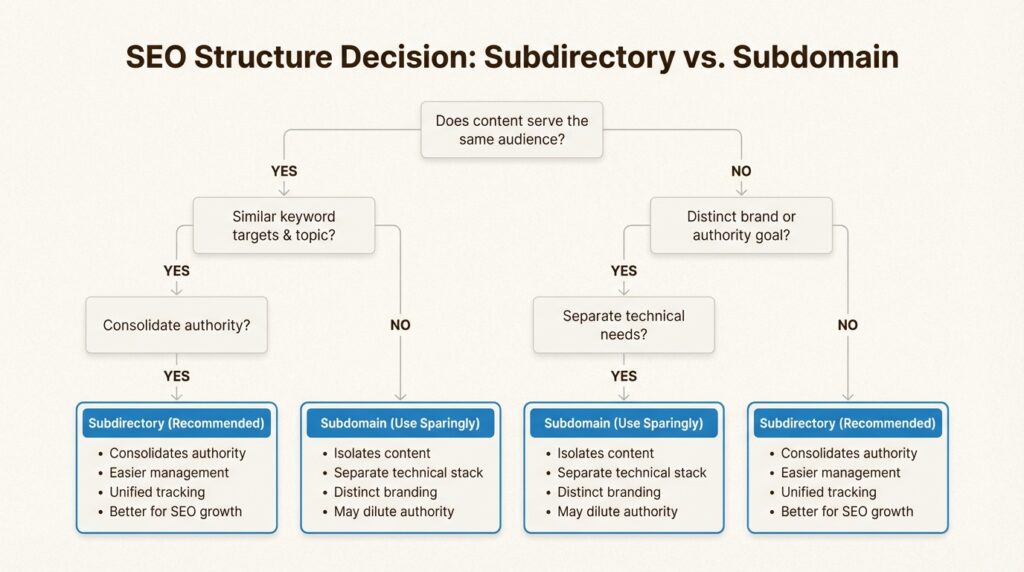
- Does this content serve the same audience as my main site?
- Will it target the same or similar keywords?
- Do I want this content to boost my main domain’s authority?
- Is the content closely related to my core business?
If you answered yes to most of these, use a subdirectory. If the content is truly separate (different audience, different purpose, different business line), a subdomain might be the right call.
Best practices for subdomain SEO
If you decide subdomains are the right choice for your situation, here’s how to maximize their SEO potential.
Content strategy
Create truly unique content. Don’t duplicate content between your domain and subdomain. Google will see this as plagiarism, even though you own both sites. Each subdomain needs its own distinct content strategy.
Target different keywords. Your subdomain should go after keywords your main domain doesn’t cover. This prevents cannibalization and expands your overall search footprint.
Interlink strategically. Build clear navigation between your subdomain and main domain. Footer links, header navigation, and contextual links all help users (and Google) understand the relationship between the two.
Technical setup
Separate robots.txt files. Each subdomain needs its own robots.txt file. Your www.robots.txt won’t apply to other subdomains.
Individual XML sitemaps. Create separate sitemaps for each subdomain and submit them individually to Google Search Console.
hreflang for international subdomains. If you’re using subdomains for language or regional targeting, implement hreflang tags correctly to help Google serve the right version to the right audience. Google’s international targeting guide provides implementation details.
SSL certificates. Each subdomain needs its own SSL certificate (or use a wildcard certificate that covers all subdomains).
Tracking and analytics
Google Search Console setup. You’ll need to verify each subdomain separately in GSC, or use a domain property to track all subdomains together. Domain properties show data across all subdomains and protocols, which is useful for getting the full picture. Google Search Central documentation covers verification requirements.
Google Analytics 4 configuration. Set up cross-domain tracking so you can follow users as they move between your main domain and subdomains. Without this, GA will treat subdomain visits as separate sessions, inflating your metrics and breaking your attribution.
Monitor separately. Track each subdomain’s performance individually. They’ll have different traffic patterns, keyword rankings, and conversion rates.
Common subdomain use cases
Let’s look at when subdomains are actually the right choice.
International websites
Regional subdomains like fr.airbnb.com or en.wikipedia.org make sense when you need completely localized experiences. The subdomain signals to users (and search engines) that this is a distinct regional version of your site.
Support and help centers
Many companies isolate support content on subdomains (help.etsy.com, support.zendesk.com). This keeps potentially large help documentation separate from the main marketing site while still maintaining brand consistency.
E-commerce stores
If your store is a completely separate experience from your main site, a subdomain can work. However, for most businesses, keeping the store in a subdirectory (yoursite.com/shop) is better for SEO because product pages can benefit from the main domain’s authority.
Testing and staging environments
Development subdomains (staging.yoursite.com, dev.yoursite.com) are standard practice. Just make sure to noindex them so Google doesn’t index your test content. Add a robots.txt disallow rule or meta robots noindex tag to keep them out of search results.
SaaS platforms and user dashboards
SaaS or app-style experiences often live on subdomains (app.example.com, dashboard.example.com). This makes sense when the user experience is fundamentally different from your marketing site.
Migrating from subdomain to subdirectory
If you currently have content on a subdomain and want to move it to a subdirectory, here’s what you need to know.
When migration makes sense
- Your blog is on a subdomain but targets the same audience as your main site
- You want to consolidate domain authority
- You’re doing double SEO work for minimal benefit
- Your subdomain content is closely related to your main business
Migration steps
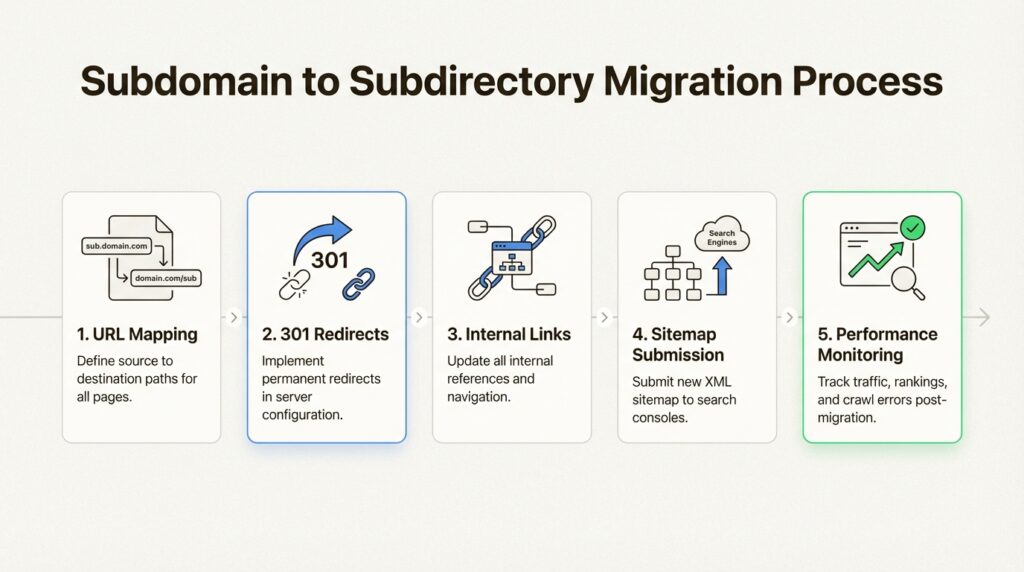
- Map your URLs. Create a complete list of all URLs on your subdomain and plan where they’ll live on the main domain.
- Set up 301 redirects. Redirect every subdomain URL to its new subdirectory location. This passes most of the link equity to the new URLs.
- Update internal links. Change all navigation, footer links, and internal references to point to the new subdirectory URLs.
- Submit sitemap changes. Update your XML sitemaps and submit them to Google Search Console.
- Monitor closely. Watch for crawl errors, ranking changes, and traffic fluctuations in the weeks following migration.
Common pitfalls
- Missing redirects. Every subdomain URL needs a 301 redirect. Missing even a few can result in 404 errors and lost traffic.
- Internal links not updated. Old subdomain links in your content will redirect, but they should be updated to the new URLs for efficiency.
- Expecting immediate results. It can take weeks or months for Google to fully process the migration and for rankings to stabilize.
Subdomains and AI search visibility
Here’s something most subdomain guides miss: how subdomains affect your visibility in AI search engines like ChatGPT, Claude, and Perplexity.
AI crawlers discover and index content similarly to traditional search engines, but with some key differences. They look for authoritative sources, consistent brand mentions, and clear content relationships.
When your content is split across subdomains, AI systems may not always connect the dots between your main domain and subdomain content. This can lead to:
- Fragmented brand mentions in AI responses
- Inconsistent citation of your content
- Missed opportunities for your subdomain content to be referenced alongside your main domain
The key is consistency. Ensure clear linking between your domain and subdomains, consistent branding, and unified messaging. This helps AI systems understand that blog.yoursite.com and yoursite.com are part of the same entity.
For businesses serious about AI search visibility, our GEO services help optimize your presence across both traditional and AI search engines. We also cover this in our guide to AI search optimization.
Build a stronger subdomain strategy
Subdomains aren’t inherently bad for SEO, but they’re often used when subdirectories would perform better. The key is understanding when separation truly makes sense for your business goals.
Here’s what to remember:
- Google treats subdomains as separate websites, not extensions of your main domain
- Subdirectories consolidate authority; subdomains fragment it
- Use subdomains for truly distinct content, audiences, or technical requirements
- Migration from subdomain to subdirectory is possible but requires proper planning
- AI search visibility benefits from consistent branding across domains and subdomains
If you’re unsure about your current subdomain strategy or planning a migration, getting expert guidance can save you months of trial and error. At Decoding, we specialize in technical SEO that drives measurable results, not just theoretical best practices.
We also help businesses track their visibility across AI search engines with our AI brand visibility tracker, so you can see exactly how your content performs in both traditional and AI-powered search.
The subdomain vs. subdirectory debate isn’t about finding the “right” answer. It’s about finding the right answer for your specific situation. Get that decision wrong, and you’re fighting an uphill SEO battle. Get it right, and your content works together instead of competing against itself.
Frequently Asked Questions
Do subdomains hurt your main domain’s SEO?
Subdomains don’t directly hurt your main domain, but they don’t help it either. Since Google treats subdomains as separate entities, they don’t share authority, backlinks, or trust signals with the main domain. This means you’re essentially starting from scratch with each subdomain.
Is it better to use a subdomain or subdirectory for a blog?
For most businesses, a subdirectory (yoursite.com/blog) is better for SEO. It consolidates all your content under one domain, so every blog post contributes to your main site’s authority. Real-world case studies show traffic gains when blogs move from subdomains to subdirectories.
Can subdomains rank in Google search?
Yes, subdomains can absolutely rank in Google. Google indexes and ranks subdomains just like any other website. The challenge is that they need to build their own authority and backlink profile rather than benefiting from the main domain’s existing SEO strength.
How do I track SEO performance for subdomains?
Set up each subdomain as a separate property in Google Search Console, or use a domain property to track all subdomains together. In Google Analytics 4, configure cross-domain tracking to follow users between your main domain and subdomains. You’ll also want to track rankings separately for each subdomain.
Should I migrate my subdomain blog to a subdirectory?
If your blog targets the same audience and keywords as your main site, migration is usually worth considering. The process involves setting up 301 redirects from subdomain URLs to new subdirectory URLs, updating internal links, and monitoring performance closely. Many businesses see organic traffic increases after migration.
Do AI search engines like ChatGPT handle subdomains differently than Google?
AI crawlers discover subdomains similarly to traditional search engines, but they may not always connect subdomain content to the main domain brand. Consistent linking, branding, and messaging across your domain and subdomains helps AI systems understand the relationship and cite your content appropriately.










Leave a Reply