


29% of websites have duplicate content issues (Study from Raven by TapClicks). That means nearly 1 in 3 businesses are unknowingly sabotaging their own SEO efforts. If your site is in that group, you’re essentially splitting your ranking power across multiple versions of the same content, confusing search engines, and diluting the authority you’ve worked hard to build.
Duplicate content is fixable. And in most cases, it won’t even get you penalized by Google. But left unaddressed, it quietly erodes your organic visibility while your competitors pull ahead.
This guide shows you exactly how to identify, fix, and prevent duplicate content issues on your site. Whether you’re dealing with technical URL variations or content that’s been scraped and republished elsewhere, we’ve got you covered.
What is duplicate content?
Google defines duplicate content as “substantive blocks of content within or across domains that either completely match other content or are appreciably similar. Mostly, this is not deceptive in origin.”
Let’s break that down.
Duplicate content falls into two main categories:
- Internal duplicate content happens when the same content appears at multiple URLs on your own site. Think product pages accessible through different category paths, or blog posts that live in both your blog archive and tag pages.
- External duplicate content occurs when your content appears on other websites. This might be syndicated press releases, scraped blog posts, or manufacturer product descriptions that dozens of e-commerce sites use.
There’s also a distinction between exact duplicates and near-duplicates. Exact duplicates are identical copies at different URLs. Near-duplicates are pages with only minor variations, like location pages for different cities that use the same template with just the city name changed.
Here’s the key misconception to clear up: duplicate content is rarely a penalty issue. Google’s Matt Cutts has stated that 25-30% of the web is duplicate content, and that’s okay. Google filters duplicates rather than punishing them. The real problem isn’t a penalty. It’s that your content doesn’t perform as well as it could.
Why duplicate content hurts your SEO
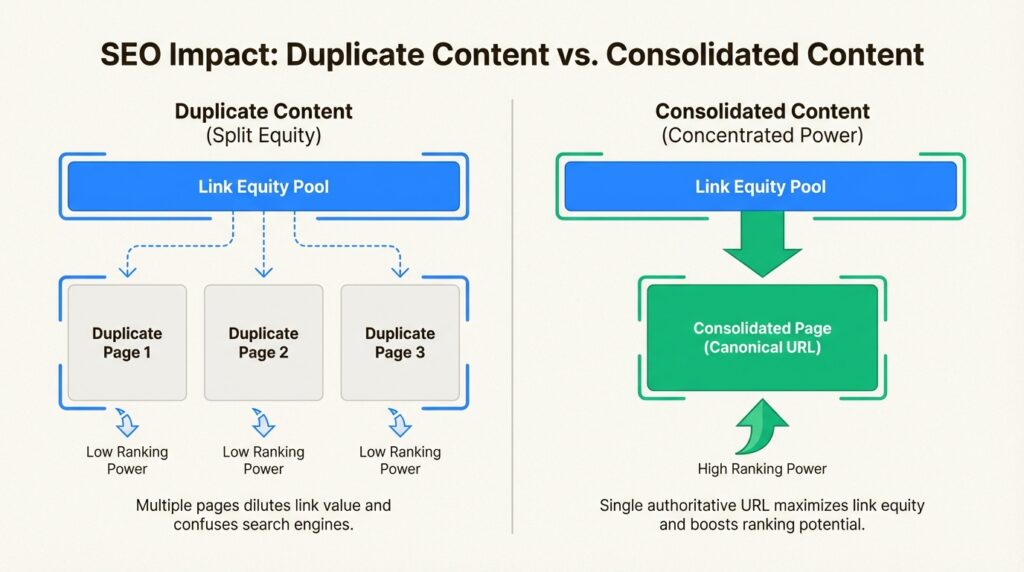
When multiple versions of the same content exist, search engines face a dilemma: which one should they rank?
This creates several practical problems.
Diluted link equity. Say you’ve created a fantastic resource that earns backlinks from ten different websites. But because of a technical issue, that resource exists at three different URLs. Those ten backlinks get split across three pages instead of consolidating on one. Instead of one strong page, you have three weaker ones.
Wasted crawl budget. Search engines allocate a limited amount of time and resources to crawling your site. When they spend that budget on duplicate pages, they have less capacity to discover and index your new, unique content. For large sites, this can mean important pages sit unindexed for weeks.
Ranking confusion. When Google finds multiple versions of the same content, it has to choose which one to show in search results. It might not choose the version you prefer. The “wrong” URL could end up ranking, sending traffic to a less optimized page while your preferred version languishes.
AI search impact. Here’s something most guides miss: duplicate content affects your visibility in AI search engines like ChatGPT, Perplexity, and Claude. These systems prioritize authoritative, unique content when generating answers. When your content is fragmented across multiple URLs, AI systems may struggle to identify your site as the definitive source, reducing your chances of being cited in AI-generated responses.
The bottom line? Duplicate content doesn’t trigger penalties, but it does cap your SEO potential. Fixing it is one of the highest-ROI technical SEO improvements you can make.
Common causes of duplicate content
Understanding why duplicate content happens is the first step to preventing it. Most duplication is unintentional, caused by technical configurations or content management practices rather than deliberate copying.
Technical causes
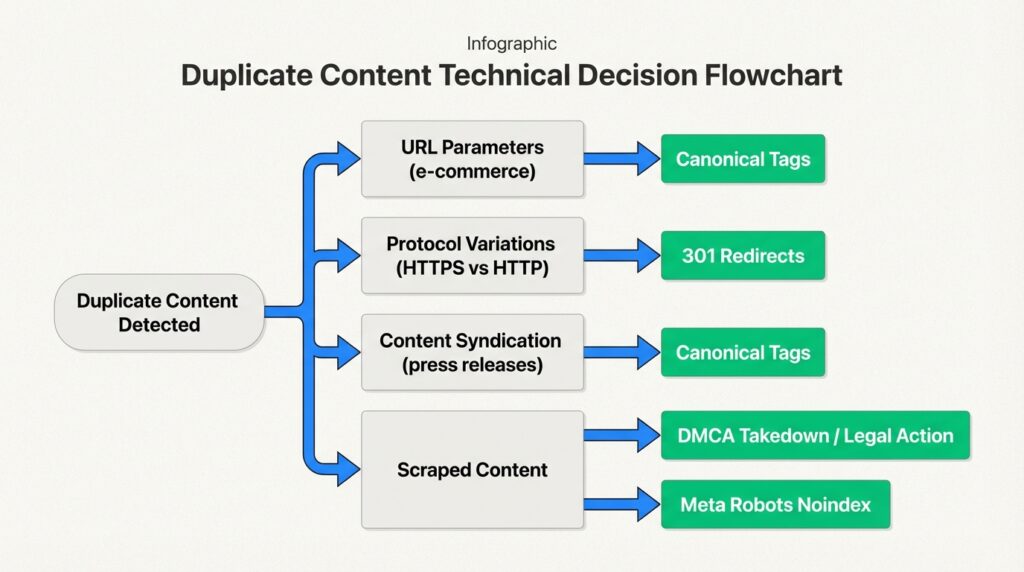
URL parameters are the biggest culprit. E-commerce sites often use parameters for filtering and sorting products. A single product page might exist at:
example.com/shoesexample.com/shoes?size=9example.com/shoes?size=9&color=blackexample.com/shoes?color=black&size=9
Each URL shows essentially the same content, but search engines treat them as separate pages. Tracking parameters (UTM codes, session IDs) create the same problem.
Protocol and subdomain variations can create four versions of your entire site if not handled properly:
http://www.example.comhttp://example.comhttps://www.example.comhttps://example.com
Trailing slash inconsistencies are another common issue. Google treats example.com/page and example.com/page/ as different URLs. If both versions serve the same content without proper redirects, you’ve got duplicates.
Mobile configurations like separate mobile subdomains (m.example.com) or AMP pages create duplicate versions unless properly canonicalized.
Staging sites left accessible and indexable after launch are essentially complete duplicates of your production site. We’ve seen this issue tank organic traffic for weeks until discovered.
CMS-generated pages like category archives, tag pages, and author pages often contain snippets of the same content repeated across multiple URLs.
Content causes
Manufacturer descriptions are an e-commerce epidemic. When fifty retailers all use the same product description from the manufacturer, Google has to choose which site to rank. Usually, it’s the one with the highest domain authority, not necessarily the one that added the content first.
Syndicated content like press releases distributed across multiple news sites creates external duplication. This is usually fine if handled properly, but can cause issues if the syndicated version outranks your original.
Location pages for service businesses often fall into the near-duplicate trap. A plumber creating separate pages for “plumber in Boston,” “plumber in Cambridge,” and “plumber in Somerville” with only the city name changed is creating near-duplicate content.
Scraped content happens when other sites copy your content without permission. This is less common but more problematic, especially if the scraping site has higher authority than yours.
How to find duplicate content on your site
You can’t fix what you can’t find. Here’s how to identify duplicate content issues systematically.
Using Google Search Console
Start with the free tools Google provides. In Google Search Console, navigate to Indexing > Pages. Look for these status warnings:
- Duplicate without user-selected canonical: Google found duplicate URLs but you haven’t specified a preferred version
- Duplicate, Google chose different canonical than user: You specified a canonical, but Google disagreed and chose a different one
- Duplicate, submitted URL not selected as canonical: Your sitemap includes a URL that Google considers a duplicate of another page
Click into any of these categories to see the affected URLs. Export them for analysis. The URL Inspection tool shows you which URL Google has selected as the canonical for any given page, helping you understand where signals are being consolidated.
Using SEO tools
For a more comprehensive analysis, dedicated SEO tools provide deeper insights:
Screaming Frog SEO Spider is the industry standard for technical SEO audits. The free version crawls up to 500 URLs. It identifies exact duplicates by default. For near-duplicates, configure the “Near Duplicate” option under Config > Content > Duplicates. You can adjust the similarity threshold (90% is the default) based on your needs.
SEMrush Site Audit flags pages that are at least 85% identical, along with duplicate title tags and meta descriptions. Run an audit, then search for “duplicate” in the Issues tab.
Siteliner offers a free scan of up to 500 pages, showing you exactly which content is duplicated and where. It’s particularly useful for finding internal duplication.
Copyscape is the go-to tool for finding external duplicates. Enter a URL to see where else that content appears on the web. The premium version lets you scan your entire site automatically.
Ahrefs Site Audit provides similar duplicate content detection to SEMrush, with the added benefit of seeing how your duplicate pages are performing in search.
Manual checks
Sometimes the simplest methods work best. Try these quick checks:
Site: operator search. Search Google for site:yourdomain.com "exact phrase from your content" to see how many times that phrase appears on your site. If it shows up on multiple URLs unexpectedly, you’ve found duplicates.
Review indexed pages. Search site:yourdomain.com and look at the total number of indexed pages. If that number is significantly higher than the number of pages you actually created, you likely have duplicate or thin content issues.
Check for common URL patterns. Look for URLs containing ?, &, sessionid, utm_, or /page/ that might indicate parameterized or paginated duplicates.
How to fix duplicate content issues
Once you’ve identified duplicates, you need to choose the right fix for each situation. There’s no one-size-fits-all solution.
301 redirects
A 301 redirect tells search engines that a page has permanently moved to a new URL. It passes most of the link equity from the old URL to the new one.
Use 301 redirects when:
- Consolidating multiple similar pages into one
- Moving from HTTP to HTTPS
- Standardizing www vs non-www versions
- Removing trailing slash variations
- Decommissioning old pages that have been replaced
Implementation varies by server. On Apache, you can add redirects to your .htaccess file. On Nginx, use the server configuration. Most content management systems and CDNs offer simpler redirect interfaces. WordPress users can use plugins like Redirection or RankMath to manage redirects without touching code.
Canonical tags
The rel=canonical tag is an HTML element that tells search engines which version of a page is the preferred, canonical version. Unlike a redirect, it doesn’t send users to a different URL. It just consolidates ranking signals to the specified canonical URL.
Use canonical tags when:
- Multiple versions of a page need to exist for users (like filtered product pages)
- You have parameterized URLs that serve the same content
- Syndicating content to other sites
- Dealing with mobile/AMP versions of pages
The syntax is simple. Add this to the <head> section of the non-canonical page:
<link rel="canonical" href="https://www.example.com/preferred-url/" />Self-referencing canonicals are a best practice. Every page should have a canonical tag pointing to itself. This prevents issues with tracking parameters and scrapers. If someone scrapes your content and includes your self-referencing canonical, search engines will credit your original version.
For paginated content, each page should have a self-referencing canonical. Don’t point all pages to the first page in the series. Each page in a pagination sequence is unique content, not a duplicate.
Noindex meta tags
The noindex directive tells search engines not to include a page in their index. The page can still be crawled, but it won’t appear in search results.
Use noindex when:
- You have staging or development environments that need to stay accessible
- Filtered/sorted versions of pages don’t need to rank
- Internal search result pages are being indexed
- Tag or category archives provide no unique value
- You have thin or placeholder pages
The syntax:
<meta name="robots" content="noindex,follow">The follow attribute is important. It tells search engines they can still crawl links on the page, passing link equity through to other pages.
Critical note: Don’t block noindexed pages in your robots.txt file. If search engines can’t crawl the page, they won’t see the noindex directive. The page could still appear in search results if it’s linked from other sites.
Content consolidation
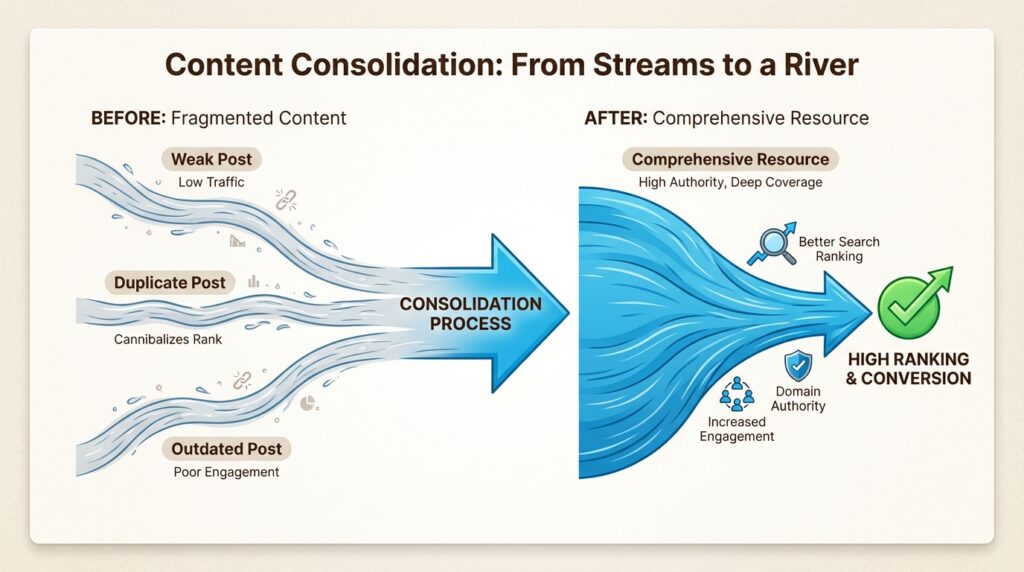
Sometimes the best solution is to merge multiple similar pages into one comprehensive resource. This is particularly effective for:
- Multiple blog posts covering the same topic
- Location pages with nearly identical content
- Product variants that don’t need separate pages
When consolidating:
- Choose the strongest URL (the one with the most backlinks or traffic)
- Merge the best content from all versions into that URL
- 301 redirect all other versions to the chosen URL
- Update internal links to point to the new canonical version
The result is one stronger page instead of several weak ones.
Preventing duplicate content
Fixing existing duplicates is important, but preventing new ones is even better. Build these practices into your workflow:
Plan URL structures early. Decide on your canonical domain format (HTTPS + www or non-www) before launch. Implement 301 redirects from day one so duplicates never get indexed in the first place.
Use self-referencing canonicals by default. Make them part of your page template. Every page should canonicalize to itself unless there’s a specific reason to point elsewhere.
Configure CMS settings properly. Most content management systems have options to control how archives, tags, and taxonomies work. Disable features you don’t need. Set canonical URLs for the features you do use.
Run regular audits. For most sites, a quarterly duplicate content check is sufficient. Large e-commerce sites or publishers might need monthly reviews. Add this to your SEO calendar.
Establish content creation guidelines. If you have a team creating content, make sure they understand duplicate content issues. Provide templates that include canonical tags. Review new pages for unintentional duplication before publishing.
Monitor your staging environment. Use HTTP authentication or IP restrictions to keep staging sites private. If a staging site does get indexed, use the URL Removal tool in Google Search Console, then add noindex tags and authentication to prevent reindexing.
Fix your duplicate content SEO issues today
Duplicate content is one of those SEO issues that compounds over time. The longer you leave it, the more link equity gets diluted and the harder it becomes to sort out. But the fix is straightforward: identify the duplicates, choose the right solution for each type, and implement preventive measures so the problem doesn’t return.
Start with Google Search Console to see what Google has already flagged. Run a crawl with Screaming Frog or SEMrush to find duplicates Google hasn’t discovered yet. Prioritize fixes based on traffic and business impact. High-traffic pages with duplicate issues should be your first targets.
If you’re dealing with duplicate content at scale, or if technical SEO isn’t your team’s core competency, we can help. At Decoding, we specialize in technical SEO audits that uncover these hidden issues and provide actionable fix recommendations. We also offer an AI Visibility tool that tracks how your brand appears across AI search engines like ChatGPT and Perplexity, helping you understand how technical issues like duplicate content affect your visibility in the emerging AI search landscape.
Don’t let duplicate content silently cap your organic potential. Fix it now, and watch your consolidated pages climb the rankings.
Frequently Asked Questions
Does duplicate content SEO always result in a Google penalty?
No. Google does not penalize duplicate content in most cases. According to Google’s guidelines, duplicate content is filtered rather than penalized. Penalties only occur when duplication is deceptive or manipulative. The real issue is that duplicate content dilutes your ranking signals and can cause search engines to show the ‘wrong’ version of your content.
How much duplicate content SEO is acceptable on a website?
There’s no strict percentage, but aim for under 10% content similarity on core pages. Up to 20-30% similarity may be tolerable if properly canonicalized. The key is ensuring that pages you want to rank have unique, valuable content. Boilerplate text like navigation and footers don’t count as problematic duplication.
What is the fastest way to find duplicate content SEO issues?
Start with Google Search Console’s Indexing > Pages report. Look for statuses like ‘Duplicate without user-selected canonical’ or ‘Duplicate, Google chose different canonical than user.’ For a more comprehensive scan, use Screaming Frog SEO Spider (free for up to 500 URLs) or Siteliner for internal duplicates.
Should I use 301 redirects or canonical tags for duplicate content SEO fixes?
Use 301 redirects when you don’t need the duplicate URL to exist (like consolidating pages or standardizing domain versions). Use canonical tags when multiple versions need to remain accessible to users (like filtered product pages or tracking URLs). Redirects pass more link equity, but canonicals offer more flexibility.
How does duplicate content SEO affect AI search engines like ChatGPT?
Duplicate content can reduce your visibility in AI search engines. When your content is fragmented across multiple URLs, AI systems struggle to identify your site as the definitive source. This reduces your chances of being cited in AI-generated responses. Consolidating your content helps establish clear authority signals for both traditional and AI search.
Can I fix duplicate content SEO issues myself, or do I need a developer?
It depends on the issue. Adding canonical tags and noindex directives often requires basic HTML access or CMS knowledge. Implementing 301 redirects typically requires server access or developer assistance, especially for complex site structures. If you’re not comfortable with technical implementation, working with an SEO specialist ensures fixes are applied correctly.









Leave a Reply to Emily Cancel reply